> ## Documentation Index
> Fetch the complete documentation index at: https://docs.bfl.ml/llms.txt
> Use this file to discover all available pages before exploring further.

# FLUX.2 Image Editing

> Edit images with FLUX.2 using text prompts and multi-reference support for up to 10 images, with advanced controls and up to 4MP output.

export const MultiRefMasonry = ({inputs = [], result = {}, prompt = ""}) => {
  const [hoveredInput, setHoveredInput] = useState(-1);
  const colors = [{
    bg: "rgba(99,182,137,0.22)",
    border: "#63b689",
    text: "#63b689"
  }, {
    bg: "rgba(130,170,255,0.22)",
    border: "#82aaff",
    text: "#82aaff"
  }, {
    bg: "rgba(255,180,107,0.22)",
    border: "#ffb46b",
    text: "#ffb46b"
  }, {
    bg: "rgba(199,140,230,0.22)",
    border: "#c78ce6",
    text: "#c78ce6"
  }, {
    bg: "rgba(255,130,130,0.22)",
    border: "#ff8282",
    text: "#ff8282"
  }, {
    bg: "rgba(130,220,220,0.22)",
    border: "#82dcdc",
    text: "#82dcdc"
  }, {
    bg: "rgba(220,200,120,0.22)",
    border: "#dcc878",
    text: "#dcc878"
  }, {
    bg: "rgba(200,160,180,0.22)",
    border: "#c8a0b4",
    text: "#c8a0b4"
  }];
  const renderPrompt = () => {
    if (!prompt) return null;
    const parts = [];
    let lastIndex = 0;
    const re = /\b(image\s+(\d))\b/gi;
    let m;
    while ((m = re.exec(prompt)) !== null) {
      if (m.index > lastIndex) parts.push({
        text: prompt.slice(lastIndex, m.index),
        idx: -1
      });
      parts.push({
        text: m[1],
        idx: parseInt(m[2], 10) - 1
      });
      lastIndex = m.index + m[0].length;
    }
    if (lastIndex < prompt.length) parts.push({
      text: prompt.slice(lastIndex),
      idx: -1
    });
    return parts.map((p, i) => {
      if (p.idx >= 0 && p.idx < colors.length) {
        const c = colors[p.idx];
        return <span key={i} style={{
          color: c.text,
          fontWeight: 700,
          padding: "1px 5px",
          borderRadius: "3px",
          background: hoveredInput === p.idx ? c.bg : "transparent",
          transition: "background 200ms"
        }}>
            {p.text}
          </span>;
      }
      return <span key={i}>{p.text}</span>;
    });
  };
  const n = inputs.length;
  const useLeftRight = n <= 4;
  const inputItem = (img, idx) => {
    const c = colors[idx % colors.length];
    const isHovered = hoveredInput === idx;
    return <div key={idx} onMouseEnter={() => setHoveredInput(idx)} onMouseLeave={() => setHoveredInput(-1)} style={{
      position: "relative",
      overflow: "hidden",
      borderRadius: "4px",
      cursor: "default",
      outline: isHovered ? "2px solid " + c.border : "2px solid transparent",
      outlineOffset: "-2px",
      transition: "outline-color 150ms ease"
    }}>
        <img src={img.src} alt={img.label || "Input " + (idx + 1)} style={{
      display: "block",
      width: "100%",
      height: "auto",
      pointerEvents: "none"
    }} />
        <div style={{
      position: "absolute",
      top: "4px",
      left: "4px",
      width: "22px",
      height: "22px",
      borderRadius: "50%",
      background: c.border,
      color: "#000",
      display: "flex",
      alignItems: "center",
      justifyContent: "center",
      fontSize: "0.65rem",
      fontWeight: 800,
      boxShadow: "0 1px 4px rgba(0,0,0,0.5)"
    }}>
          {idx + 1}
        </div>
      </div>;
  };
  const resultItem = <div style={{
    position: "relative",
    overflow: "hidden",
    borderRadius: "4px"
  }}>
      <img src={result.src} alt={result.label || "Result"} style={{
    display: "block",
    width: "100%",
    height: "auto",
    pointerEvents: "none"
  }} />
      <div style={{
    position: "absolute",
    top: "6px",
    right: "6px",
    padding: "3px 10px",
    borderRadius: "5px",
    background: "rgba(0,0,0,0.6)",
    backdropFilter: "blur(4px)",
    color: "#fff",
    fontSize: "0.65rem",
    fontWeight: 600
  }}>
        Result
      </div>
    </div>;
  const inputRows = n <= 2 ? n : n <= 4 ? 2 : n;
  const inputColsInner = n <= 3 ? 1 : 2;
  return <div className="not-prose" style={{
    borderRadius: "0.75rem",
    border: "1px solid rgba(255,255,255,0.08)",
    background: "#000000"
  }}>

      {useLeftRight ? <div style={{
    display: "grid",
    gridTemplateColumns: "1fr 2fr",
    gap: "3px",
    padding: "3px",
    alignItems: "start"
  }}>
          {}
          <div style={{
    display: "grid",
    gridTemplateColumns: "repeat(" + inputColsInner + ", 1fr)",
    gridTemplateRows: "repeat(" + inputRows + ", auto)",
    gap: "3px"
  }}>
            {inputs.map((img, idx) => inputItem(img, idx))}
          </div>
          {}
          {resultItem}
        </div> : <div style={{
    display: "flex",
    flexDirection: "column",
    gap: "3px",
    padding: "3px"
  }}>
          <div style={{
    display: "grid",
    gridTemplateColumns: "repeat(" + Math.min(n, 6) + ", 1fr)",
    gap: "3px"
  }}>
            {inputs.map((img, idx) => inputItem(img, idx))}
          </div>
          {resultItem}
        </div>}

      {}
      {prompt && <div style={{
    padding: "0.5rem 0.5rem 0.6rem"
  }}>
          <div style={{
    padding: "0.6rem 0.75rem",
    borderRadius: "6px",
    background: "rgba(255,255,255,0.06)",
    border: "1px solid rgba(255,255,255,0.10)",
    fontFamily: "monospace",
    fontSize: "0.72rem",
    lineHeight: 1.6,
    color: "rgba(255,255,255,0.7)"
  }}>
            <span style={{
    color: "rgba(255,255,255,0.35)",
    fontSize: "0.6rem",
    marginRight: "5px"
  }}>prompt:</span>
            {renderPrompt()}
          </div>
        </div>}
    </div>;
};

**Edit images like magic.** Describe what you want changed, and FLUX.2 makes it happen. Combine furniture from multiple photos into one room. Replace people with animals while keeping proportions perfect. Change backgrounds, swap textures, edit text—all while maintaining photorealism that matches professional photography.

Reference multiple images simultaneously - up to 8 via API, up to 10 in the playground. Use **\[max]** for highest precision editing, **\[pro]** for production at scale, **\[flex]** for fine-grained control, or **\[klein]** for cost-efficient high-volume editing.

<Tip>
  **Try it live** - Upload images and describe your edits in our [playground](https://playground.bfl.ai). See the magic happen in seconds.
</Tip>

## Examples

### Single Reference

<Columns cols={2}>
  <Frame>
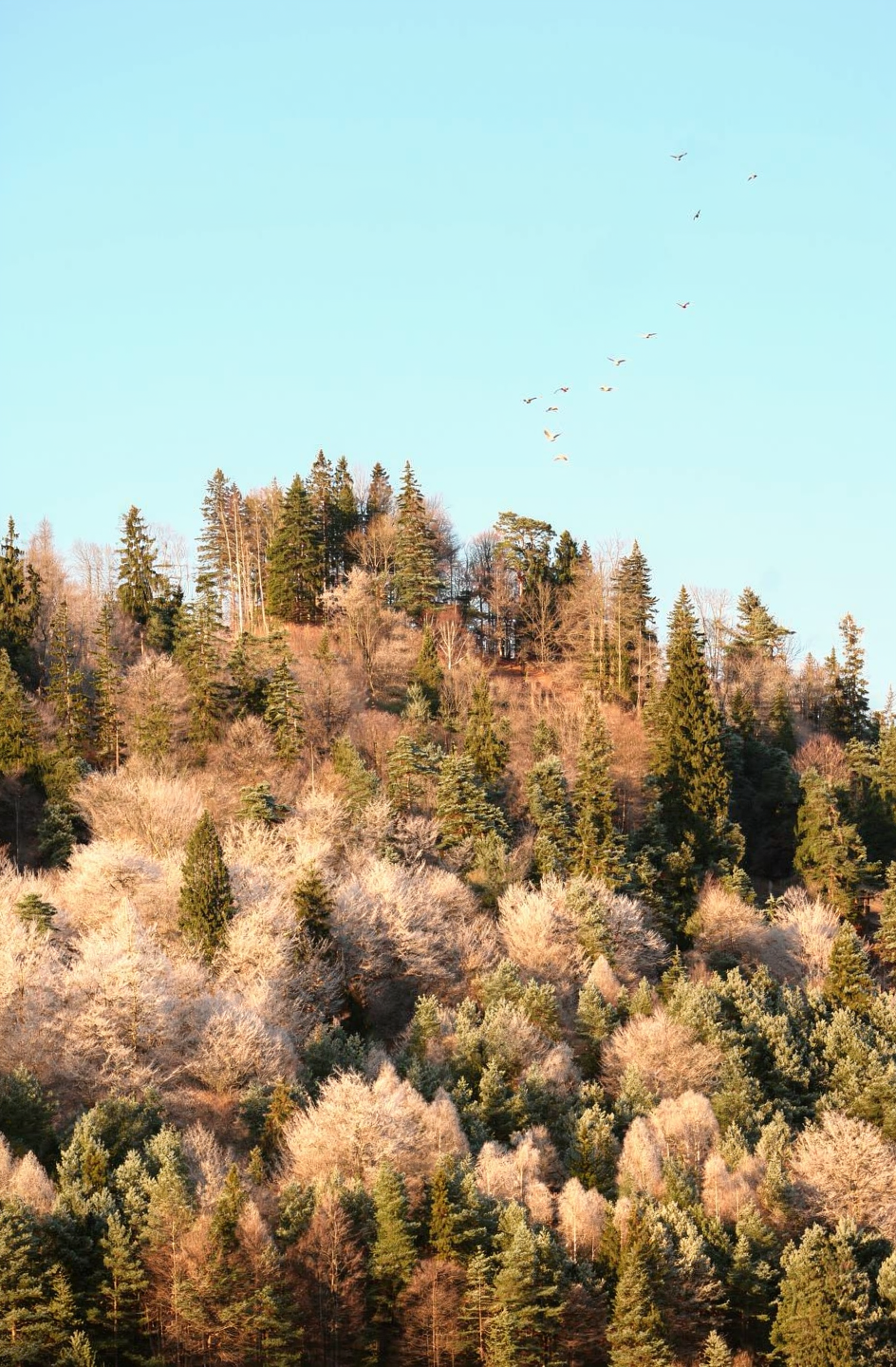
    <img src="https://cdn.sanity.io/images/2gpum2i6/production/37390d77fe6b92290207aba40c5106688881d749-987x1481.png" alt="Foggy forest hillside" />
  </Frame>

  <Frame>
    <img src="https://cdn.sanity.io/images/2gpum2i6/production/38c3c499ab82a551a737fa8660a6caa4b9c67868-944x1440.png" alt="Sunny forest hillside with birds" />
  </Frame>
</Columns>

<Prompt description="Change the weather to a warm sunny day with clear blue sky and add a flock of birds flying over the treetops." actions={[]} />

### Multi Reference

<MultiRefMasonry
  inputs={[
{ src: "https://cdn.sanity.io/images/2gpum2i6/production/1115a1438ca3daaad5b54b95ea2b174db57b03f4-500x333.png", label: "Chickens" },
{ src: "https://cdn.sanity.io/images/2gpum2i6/production/e27fe799702fe6df233cbf76e44af09f0babe0f6-500x750.png", label: "Mat A" },
{ src: "https://cdn.sanity.io/images/2gpum2i6/production/b215d41ffba47fa273687db0a2c3ba854e8fdf19-500x333.png", label: "Pillow" },
{ src: "https://cdn.sanity.io/images/2gpum2i6/production/dad25402f86c0e338f430679ea7253d38309fd71-421x750.png", label: "Mat B" },
{ src: "https://cdn.sanity.io/images/2gpum2i6/production/9606b80fdb30699eef8876d51a2d958b5489f56b-500x333.png", label: "Wood" },
{ src: "https://cdn.sanity.io/images/2gpum2i6/production/4e3452cf324b7a9a1bd04c46861ba1bbf7d94433-500x333.png", label: "Eggs" },
]}
  result={{ src: "https://cdn.sanity.io/images/2gpum2i6/production/4bd08e6e18e3ef9dc1a0a153ff304e38f8a4d233-496x320.png" }}
  prompt="Create a house for the chickens from image 1 using materials from images 2, 3, 4, and 5. Use the wood from image 5 for the base, the materials from images 2 and 4 for the walls and floor, and the material from image 3 for a small pillow nest. Place the chickens from image 1 in their new home, sitting on the pillow nest. Next to them, include the eggs from image 6. Apply the style of image 1 to the entire new scene."
/>

## API Integration

### Create Request

<CodeGroup>
  ```python Python theme={null}
  import os
  import requests

  # Using image URLs directly (simplest)
  # flux-2-pro-preview reflects our latest advances (use flux-2-pro for a pinned model)
  response = requests.post(
      'https://api.bfl.ai/v1/flux-2-pro-preview',
      headers={
          'accept': 'application/json',
          'x-key': os.environ.get("BFL_API_KEY"),
          'Content-Type': 'application/json',
      },
      json={
          'prompt': '<What you want to edit on the image>',
          'input_image': 'https://example.com/your-image.jpg',
          # 'input_image_2': 'https://example.com/reference-2.jpg',  # Optional
      },
  ).json()

  request_id = response["id"]
  polling_url = response["polling_url"]
  ```

  ```typescript TypeScript theme={null}
  // Using image URLs (simplest method)
  // flux-2-pro-preview reflects our latest advances (use flux-2-pro for a pinned model)
  const response = await fetch("https://api.bfl.ai/v1/flux-2-pro-preview", {
    method: "POST",
    headers: {
      accept: "application/json",
      "x-key": process.env.BFL_API_KEY!,
      "Content-Type": "application/json",
    },
    body: JSON.stringify({
      prompt: "<What you want to edit on the image>",
      input_image: "https://example.com/your-image.jpg",
      // input_image_2: "https://example.com/reference-2.jpg",  // Optional
    }),
  });

  const { id: requestId, polling_url: pollingUrl } = await response.json();
  ```

  ```go Go theme={null}
  package main

  import (
  	"bytes"
  	"encoding/json"
  	"fmt"
  	"net/http"
  	"os"
  )

  func main() {
  	// Using image URLs (simplest method)
  	// flux-2-pro-preview reflects our latest advances (use flux-2-pro for a pinned model)
  	payload, _ := json.Marshal(map[string]string{
  		"prompt":      "<What you want to edit on the image>",
  		"input_image": "https://example.com/your-image.jpg",
  		// "input_image_2": "https://example.com/reference-2.jpg",  // Optional
  	})

  	req, _ := http.NewRequest("POST", "https://api.bfl.ai/v1/flux-2-pro-preview", bytes.NewBuffer(payload))
  	req.Header.Set("accept", "application/json")
  	req.Header.Set("x-key", os.Getenv("BFL_API_KEY"))
  	req.Header.Set("Content-Type", "application/json")

  	resp, _ := http.DefaultClient.Do(req)
  	defer resp.Body.Close()

  	var result map[string]interface{}
  	json.NewDecoder(resp.Body).Decode(&result)

  	requestId := result["id"].(string)
  	pollingUrl := result["polling_url"].(string)
  	fmt.Println(requestId, pollingUrl)
  }
  ```

  ```bash cURL theme={null}
  # Using image URLs (simplest method)
  # flux-2-pro-preview reflects our latest advances (use flux-2-pro for a pinned model)
  request=$(curl -X POST \
    'https://api.bfl.ai/v1/flux-2-pro-preview' \
    -H 'accept: application/json' \
    -H "x-key: ${BFL_API_KEY}" \
    -H 'Content-Type: application/json' \
    -d '{
      "prompt": "<What you want to edit on the image>",
      "input_image": "https://example.com/your-image.jpg",
      "input_image_2": "https://example.com/reference-2.jpg"
    }')
  echo $request
  request_id=$(echo $request | jq -r .id)
  polling_url=$(echo $request | jq -r .polling_url)
  ```
</CodeGroup>

### Poll for Result

<CodeGroup>
  ```python Python theme={null}
  # This assumes that the `polling_url` variable is set.

  import time
  import os
  import requests

  while True:
      time.sleep(0.5)
      result = requests.get(
          polling_url,
          headers={
              'accept': 'application/json',
              'x-key': os.environ.get("BFL_API_KEY"),
          },
      ).json()

      if result['status'] == 'Ready':
          print(f"Image ready: {result['result']['sample']}")
          break
      elif result['status'] in ['Error', 'Failed']:
          print(f"Generation failed: {result}")
          break
  ```

  ```typescript TypeScript theme={null}
  // This assumes that the `pollingUrl` variable is set.

  while (true) {
    await new Promise((resolve) => setTimeout(resolve, 500));

    const result = await fetch(pollingUrl, {
      headers: {
        accept: "application/json",
        "x-key": process.env.BFL_API_KEY!,
      },
    }).then((res) => res.json());

    if (result.status === "Ready") {
      console.log(`Image ready: ${result.result.sample}`);
      break;
    } else if (["Error", "Failed"].includes(result.status)) {
      console.log(`Generation failed: ${JSON.stringify(result)}`);
      break;
    }
  }
  ```

  ```go Go theme={null}
  // This assumes that the `pollingUrl` variable is set.

  for {
  	time.Sleep(500 * time.Millisecond)

  	req, _ := http.NewRequest("GET", pollingUrl, nil)
  	req.Header.Set("accept", "application/json")
  	req.Header.Set("x-key", os.Getenv("BFL_API_KEY"))

  	resp, _ := http.DefaultClient.Do(req)
  	var result map[string]interface{}
  	json.NewDecoder(resp.Body).Decode(&result)
  	resp.Body.Close()

  	status := result["status"].(string)
  	fmt.Println("Status:", status)

  	if status == "Ready" {
  		sample := result["result"].(map[string]interface{})["sample"].(string)
  		fmt.Println("Image ready:", sample)
  		break
  	} else if status == "Error" || status == "Failed" {
  		fmt.Println("Generation failed:", result)
  		break
  	}
  }
  ```

  ```bash cURL theme={null}
  while true; do
    sleep 0.5
    result=$(curl -s -X 'GET' \
      "${polling_url}" \
      -H 'accept: application/json' \
      -H "x-key: ${BFL_API_KEY}")

    status=$(echo $result | jq -r .status)
    echo "Status: $status"

    if [ "$status" == "Ready" ]; then
      echo "Result: $(echo $result | jq -r .result.sample)"
      break
    elif [ "$status" == "Error" ] || [ "$status" == "Failed" ]; then
      echo "Generation failed: $result"
      break
    fi
  done
  ```
</CodeGroup>

<Warning>
  Signed URLs are only valid for 10 minutes. Please retrieve your result within this timeframe.
</Warning>

For all available parameters and endpoint details, see the [API Reference](/api-reference).