> ## Documentation Index
> Fetch the complete documentation index at: https://docs.bfl.ml/llms.txt
> Use this file to discover all available pages before exploring further.

# FLUX 3 Image Klein

> A smaller, faster FLUX 3 Image model with open weights. Run it through the API, on Hugging Face, or in ComfyUI.

export const LoraCompare = ({items = [], baseLabel = "Base", loraLabel = "LoRA"}) => {
  const [copied, setCopied] = useState(-1);
  const copy = (idx, text) => {
    if (typeof navigator === "undefined" || !navigator.clipboard) return;
    navigator.clipboard.writeText(text).then(() => {
      setCopied(idx);
      setTimeout(() => setCopied(c => c === idx ? -1 : c), 1600);
    });
  };
  return <div className="not-prose lora-compare">
      {items.map((item, idx) => <figure className="lora-compare__item" key={idx}>
          <div className="lora-compare__pair">
            <div className="lora-compare__cell">
              <img src={item.base} alt={item.alt ? baseLabel + ": " + item.alt : ""} loading="lazy" className="lora-compare__img" />
              <span className="lora-compare__tag">{baseLabel}</span>
            </div>
            <div className="lora-compare__cell">
              <img src={item.lora} alt={item.alt ? loraLabel + ": " + item.alt : ""} loading="lazy" className="lora-compare__img" />
              <span className="lora-compare__tag lora-compare__tag--lora">{loraLabel}</span>
            </div>
          </div>
          {item.prompt ? <figcaption className="lora-compare__prompt">
              <p className="lora-compare__prompt-text">{item.prompt}</p>
              <button type="button" className="clip-slider__copy lora-compare__copy" onClick={() => copy(idx, item.prompt)}>
                {copied === idx ? "Copied" : "Copy"}
              </button>
            </figcaption> : null}
        </figure>)}
    </div>;
};

export const ClipSlider = ({items = []}) => {
  const [copied, setCopied] = useState(-1);
  const [inView, setInView] = useState(0);
  const [edges, setEdges] = useState({
    left: false,
    right: items.length > 1
  });
  const [muted, setMuted] = useState(true);
  const [viewer, setViewer] = useState(null);
  const [split, setSplit] = useState({});
  const splitAt = idx => split[idx] === undefined ? items[idx] && items[idx].split !== undefined ? items[idx].split : 50 : split[idx];
  const moveSplit = (idx, e) => {
    const r = e.currentTarget.getBoundingClientRect();
    const pct = Math.max(0, Math.min(100, (e.clientX - r.left) / r.width * 100));
    setSplit(s => ({
      ...s,
      [idx]: pct
    }));
  };
  const BOX_COLORS = ["#e8b04a", "#6fb3d9", "#e0708a", "#8fcf7a", "#b99af0", "#f08b5b", "#5fd0c0", "#d9d36f", "#9fb0c8", "#f2a3c7", "#7aa0f0", "#c7e07a"];
  const fitBox = ([y0, x0, y1, x1], w, h) => {
    const frame = 16 / 9, ar = w / h;
    const sx = ar > frame ? 1 : ar / frame, sy = ar > frame ? frame / ar : 1;
    const ox = (1 - sx) / 2, oy = (1 - sy) / 2;
    return {
      top: (oy + y0 / 1000 * sy) * 100 + "%",
      left: (ox + x0 / 1000 * sx) * 100 + "%",
      height: (y1 - y0) / 1000 * sy * 100 + "%",
      width: (x1 - x0) / 1000 * sx * 100 + "%"
    };
  };
  const [actualSize, setActualSize] = useState(false);
  const trackRef = useRef(null);
  const cardRefs = useRef([]);
  const measuredRef = useRef(false);
  const mutedRef = useRef(true);
  const videosRef = useRef([]);
  const observerRef = useRef(null);
  const getObserver = () => {
    if (observerRef.current) return observerRef.current;
    if (typeof IntersectionObserver === "undefined") return null;
    observerRef.current = new IntersectionObserver(entries => {
      entries.forEach(entry => {
        const v = entry.target;
        if (entry.isIntersecting) {
          v.muted = mutedRef.current;
          const p = v.play?.();
          if (p && typeof p.catch === "function") p.catch(() => {});
        } else {
          v.pause?.();
        }
      });
    }, {
      threshold: 0.4
    });
    return observerRef.current;
  };
  const attachVideo = el => {
    if (!el) return;
    if (!videosRef.current.includes(el)) videosRef.current.push(el);
    const io = getObserver();
    if (io) io.observe(el);
  };
  const toggleMute = () => {
    const next = !muted;
    setMuted(next);
    mutedRef.current = next;
    videosRef.current.forEach(v => {
      if (v) v.muted = next;
    });
  };
  const updateEdges = el => {
    if (!el) return;
    const max = el.scrollWidth - el.clientWidth;
    const next = {
      left: el.scrollLeft > 4,
      right: el.scrollLeft < max - 4
    };
    setEdges(prev => prev.left === next.left && prev.right === next.right ? prev : next);
    const cards = cardRefs.current.filter(Boolean);
    if (cards.length) {
      let best = 0;
      let bestDist = Infinity;
      cards.forEach((card, i) => {
        const dist = Math.abs(card.offsetLeft - el.scrollLeft - 4);
        if (dist < bestDist) {
          bestDist = dist;
          best = i;
        }
      });
      setInView(prev => prev === best ? prev : best);
    }
  };
  const attachTrack = el => {
    trackRef.current = el;
    if (!el || measuredRef.current) return;
    measuredRef.current = true;
    if (typeof requestAnimationFrame !== "undefined") {
      requestAnimationFrame(() => updateEdges(el));
    } else {
      updateEdges(el);
    }
  };
  const scrollByCard = dir => {
    const el = trackRef.current;
    if (!el) return;
    const first = cardRefs.current.find(Boolean);
    const cardW = first ? first.offsetWidth + 20 : el.clientWidth * 0.8;
    el.scrollBy({
      left: dir * cardW,
      behavior: "smooth"
    });
  };
  const scrollToCard = idx => {
    const el = trackRef.current;
    const card = cardRefs.current[idx];
    if (!el || !card) return;
    el.scrollTo({
      left: card.offsetLeft - 4,
      behavior: "smooth"
    });
  };
  const startVideo = event => {
    const video = event.currentTarget;
    video.muted = mutedRef.current;
    const p = video.play?.();
    if (p && typeof p.catch === "function") p.catch(() => {});
  };
  const copy = (text, idx) => {
    try {
      navigator.clipboard.writeText(text);
      setCopied(idx);
      setTimeout(() => setCopied(c => c === idx ? -1 : c), 2000);
    } catch (e) {}
  };
  return <div className="not-prose clip-slider">
      <button type="button" className="clip-slider__arrow clip-slider__arrow--prev" onClick={() => scrollByCard(-1)} disabled={!edges.left} aria-label="Previous clip">
        <svg width="20" height="20" viewBox="0 0 24 24" fill="none" stroke="currentColor" strokeWidth="2.2" strokeLinecap="round" strokeLinejoin="round" aria-hidden="true">
          <polyline points="15 18 9 12 15 6" />
        </svg>
      </button>

      <div className="clip-slider__track" ref={attachTrack} onScroll={e => updateEdges(e.currentTarget)}>
        {items.map((item, idx) => <article key={idx} className="clip-slider__slide" ref={el => {
    cardRefs.current[idx] = el;
  }}>
            {item.title && <h4 className="clip-slider__title">{item.title}</h4>}
            <div className={item.boxes ? "clip-slider__media has-boxes" : item.fit === "contain" ? "clip-slider__media is-fit" : item.before ? "clip-slider__media has-compare" : "clip-slider__media"}>
              {item.before ? <div className="clip-slider__compare" role="slider" tabIndex={0} aria-label={`Compare before and after: ${item.alt || ""}`} aria-valuemin={0} aria-valuemax={100} aria-valuenow={Math.round(splitAt(idx))} onPointerDown={e => {
    e.currentTarget.setPointerCapture?.(e.pointerId);
    moveSplit(idx, e);
  }} onPointerMove={e => {
    if (e.buttons) moveSplit(idx, e);
  }} onKeyDown={e => {
    if (e.key === "ArrowLeft" || e.key === "ArrowRight") {
      e.preventDefault();
      setSplit(s => ({
        ...s,
        [idx]: Math.max(0, Math.min(100, splitAt(idx) + (e.key === "ArrowLeft" ? -5 : 5)))
      }));
    }
  }}>
                  <img src={item.after} alt={item.alt ? "After: " + item.alt : ""} loading="lazy" className="clip-slider__media-el" draggable={false} />
                  <div className="clip-slider__before" style={{
    clipPath: `inset(0 ${100 - splitAt(idx)}% 0 0)`
  }}>
                    <img src={item.before} alt={item.alt ? "Before: " + item.alt : ""} loading="lazy" className="clip-slider__media-el" draggable={false} />
                  </div>
                  <span className="clip-slider__handle" style={{
    left: splitAt(idx) + "%"
  }} aria-hidden="true">
                    <svg width="18" height="18" viewBox="0 0 24 24" fill="none" stroke="currentColor" strokeWidth="2.2" strokeLinecap="round" strokeLinejoin="round"><polyline points="9 18 3 12 9 6" /><polyline points="15 6 21 12 15 18" /></svg>
                  </span>
                  <span className="clip-slider__tag clip-slider__tag--before" aria-hidden="true">{item.beforeLabel || "Before"}</span>
                  <span className="clip-slider__tag clip-slider__tag--after" aria-hidden="true">{item.afterLabel || "After"}</span>
                </div> : item.image ? <button type="button" className="clip-slider__zoom" onClick={() => {
    setActualSize(false);
    setViewer(idx);
  }} aria-label={`View full size: ${item.alt || item.title || ""}`}>
                  <img src={item.image} alt={item.alt || item.title || ""} loading="lazy" className="clip-slider__media-el" />
                  {item.boxes && item.boxes.map((b, k) => <span key={b.id} className={"clip-slider__box" + (b.bbox[0] < 60 ? " is-top" : "")} style={{
    ...fitBox(b.bbox, item.w, item.h),
    "--c": BOX_COLORS[k % BOX_COLORS.length]
  }}>
                      <i>{b.id}</i>
                    </span>)}
                </button> : <>
              <video ref={attachVideo} src={item.video} poster={item.poster} loop muted playsInline preload="metadata" onLoadedData={startVideo} onCanPlay={startVideo} aria-label={item.alt || item.title || ""} className="clip-slider__media-el" />
              <button type="button" onClick={toggleMute} aria-label={muted ? "Unmute" : "Mute"} title={muted ? "Enable sound" : "Mute"} style={{
    position: "absolute",
    top: "0.6rem",
    right: "0.6rem",
    zIndex: 4,
    width: "2rem",
    height: "2rem",
    borderRadius: "999px",
    border: "none",
    background: "rgba(8, 18, 13, 0.5)",
    color: "#fff",
    display: "inline-flex",
    alignItems: "center",
    justifyContent: "center",
    cursor: "pointer",
    backdropFilter: "blur(4px)",
    WebkitBackdropFilter: "blur(4px)"
  }}>
                {muted ? <svg width="15" height="15" viewBox="0 0 24 24" fill="none" stroke="currentColor" strokeWidth="2" strokeLinecap="round" strokeLinejoin="round" aria-hidden="true"><path d="M11 5 6 9H2v6h4l5 4V5z" /><line x1="23" y1="9" x2="17" y2="15" /><line x1="17" y1="9" x2="23" y2="15" /></svg> : <svg width="15" height="15" viewBox="0 0 24 24" fill="none" stroke="currentColor" strokeWidth="2" strokeLinecap="round" strokeLinejoin="round" aria-hidden="true"><path d="M11 5 6 9H2v6h4l5 4V5z" /><path d="M15.54 8.46a5 5 0 0 1 0 7.07" /><path d="M19.07 4.93a10 10 0 0 1 0 14.14" /></svg>}
              </button>
              </>}
            </div>

            {item.prompt && <div className="clip-slider__body">
                <div className="clip-slider__prompt">
                  <button type="button" className="clip-slider__copy" onClick={() => copy(item.prompt, idx)} aria-label={copied === idx ? "Prompt copied" : "Copy prompt"} title={copied === idx ? "Copied" : "Copy prompt"}>
                    {copied === idx ? "Copied!" : "Copy"}
                  </button>
                  <pre className="clip-slider__prompt-pre"><code>{item.prompt}</code></pre>
                </div>
              </div>}
          </article>)}
      </div>

      <button type="button" className="clip-slider__arrow clip-slider__arrow--next" onClick={() => scrollByCard(1)} disabled={!edges.right} aria-label="Next clip">
        <svg width="20" height="20" viewBox="0 0 24 24" fill="none" stroke="currentColor" strokeWidth="2.2" strokeLinecap="round" strokeLinejoin="round" aria-hidden="true">
          <polyline points="9 18 15 12 9 6" />
        </svg>
      </button>

      {items.length > 1 && <div className="clip-slider__dots">
          {items.map((item, idx) => <button key={idx} type="button" onClick={() => scrollToCard(idx)} aria-label={`Go to ${item.title || `clip ${idx + 1}`}`} className={`clip-slider__dot${idx === inView ? " is-active" : ""}`} />)}
        </div>}

      {viewer !== null && items[viewer] ? <dialog className={actualSize ? "clip-slider__viewer" : "clip-slider__viewer is-fit"} aria-label={items[viewer].alt || items[viewer].title || ""} ref={node => {
    if (node && !node.open) node.showModal();
  }} onClose={() => setViewer(null)} onClick={() => setViewer(null)}>
          <img src={items[viewer].full || items[viewer].image} alt={items[viewer].alt || items[viewer].title || ""} style={{
    cursor: actualSize ? "zoom-out" : "zoom-in"
  }} onClick={event => {
    event.stopPropagation();
    setActualSize(!actualSize);
  }} />
          <div className="clip-slider__viewer-bar" onClick={event => event.stopPropagation()}>
            <button type="button" onClick={() => setActualSize(!actualSize)}>
              {actualSize ? "Fit to screen" : "Actual size"}
            </button>
            <button type="button" onClick={() => setViewer(null)}>Close</button>
          </div>
        </dialog> : null}
    </div>;
};

<div className="flux3-overview-page flux3-page flux3-toc-page flux3-toc-wide">
  <div className="not-prose flux3-overview-copy">
    <p className="flux3-overview-copy__eyebrow">FLUX 3 Image</p>
    <h1>Klein</h1>
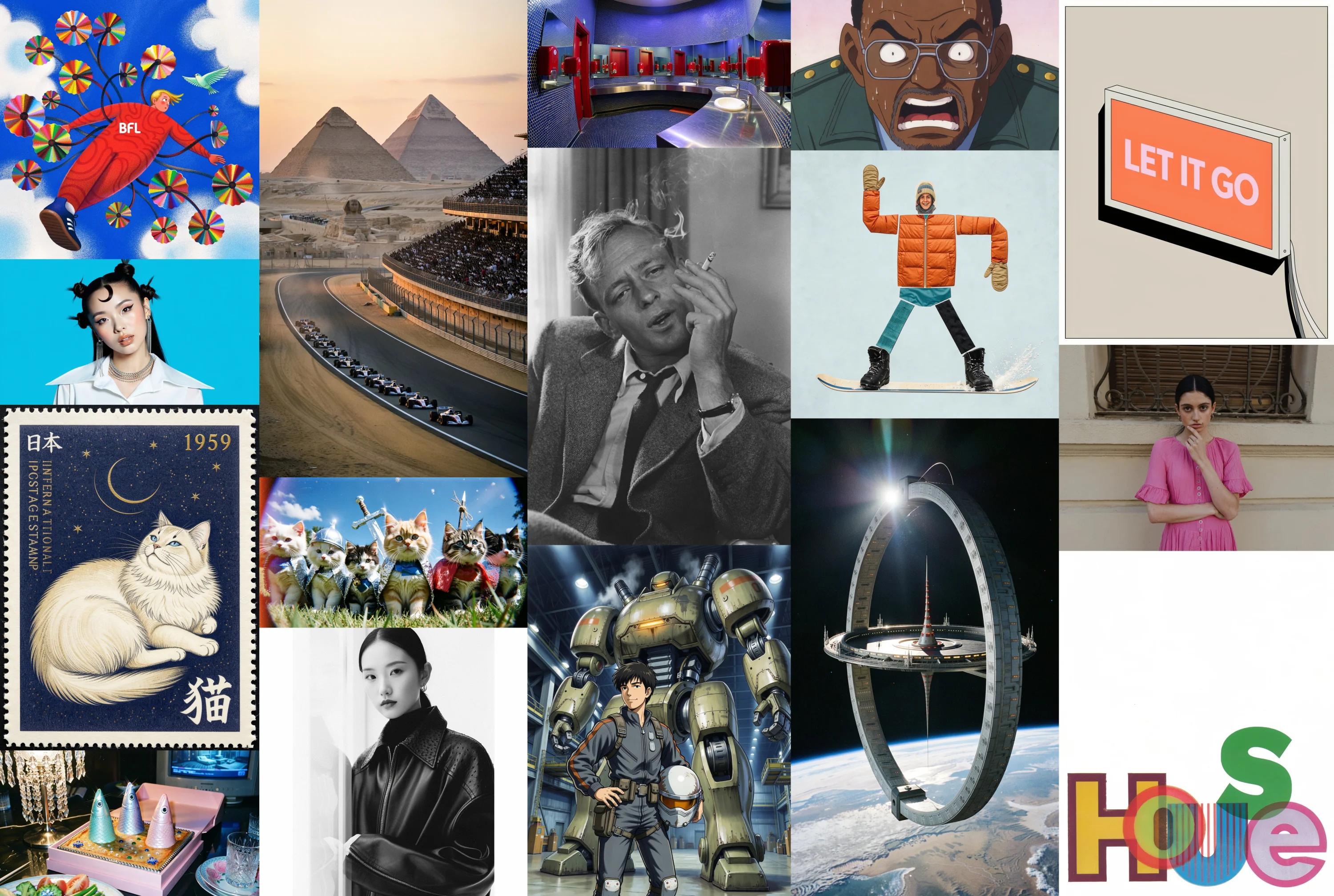
    <p>FLUX 3 Image Klein is a compact, open-weights version of FLUX 3 Image. It supports the same features: text to image, image editing, multi reference, and bounding boxes. It runs faster and fits on consumer GPUs, down to an RTX 3090.</p>
  </div>

  <Frame>
    <img src="https://cdn.sanity.io/images/2gpum2i6/production/de71410ea29050b96c2c34f47b4c7aa818c9f6c4-3000x2016.webp" alt="A grid of images generated with FLUX 3 Image Klein: illustrations, portraits, a postage stamp, anime, a space station, and typography." />
  </Frame>

  ## Specs

  FLUX 3 Image Klein comes in two variants. **Distilled** is step-distilled for fast inference. **Base** is the undistilled model for fine-tuning, LoRA training, and research.

  | | **Klein (Distilled)** | **Klein Base** |
  | - | - | - |
  | **Parameters** | 5.6B | 5.6B |
  | **Max resolution** | Up to 4K | Up to 4K |
  | **Inference steps** | 16 | 50 |
  | **Guidance (CFG)** | 1 | 3.5 |
  | **Bounding box support** | Yes | Yes |
  | **Best for** | Fast generation, local deployment | Fine-tuning, LoRA training, research |
  | **License** | [FLUX Kommunity License](https://huggingface.co/black-forest-labs/flux-3-image-klein/blob/main/LICENSE.md) | [FLUX Kommunity License](https://huggingface.co/black-forest-labs/flux-3-image-klein-base/blob/main/LICENSE.md) |
  | **Availability** | [API](/api-reference/utility/generate-an-image-with-flux-3-klein), [Hugging Face](https://huggingface.co/black-forest-labs/flux-3-image-klein) | [Hugging Face](https://huggingface.co/black-forest-labs/flux-3-image-klein-base) |

  ## Pricing

  Priced per image by output resolution. Text to image and image editing cost the same.

  | Resolution | Price per image |
  | - | - |
  | 768 × 768 | \$0.008 |
  | 1K | \$0.009 |
  | 1.5K | \$0.011 |
  | 2K | \$0.014 |
  | 4K | \$0.036 |

  See [API pricing](/quick_start/pricing#flux-3-image-klein) for all models.

  ## Ways to use it
  <Tabs>
    <Tab title="API">
      Send a request to the Klein endpoint, then poll the returned `polling_url` until `status` is `Ready`. The request takes the same fields as [FLUX 3 Image](/api-reference/utility/generate-an-image-with-flux-3).

      ```bash theme={null}
      curl --request POST \
        --url https://api.bfl.ai/v1/flux-3-image-klein \
        --header "x-key: $BFL_API_KEY" \
        --header "Content-Type: application/json" \
        --data '{
        "prompt": "A red fox curled up asleep inside an open vintage leather suitcase on the luggage rack of an old wooden train compartment, soft window light falling on its fur, photorealistic.",
        "aspect_ratio": "4:3"
      }'
      ```

      See the [API reference](/api-reference/utility/generate-an-image-with-flux-3-klein) for all parameters.
    </Tab>

    <Tab title="Diffusers / Hugging Face">
      Download the FLUX 3 Image Klein weights from [Hugging Face](https://huggingface.co/black-forest-labs/flux-3-image-klein) and run them locally with [Diffusers](https://huggingface.co/docs/diffusers).

      ```shell theme={null}
      pip install git+https://github.com/huggingface/diffusers.git
      ```

      ```python theme={null}
      import torch
      from diffusers import ModularPipeline

      pipe = ModularPipeline.from_pretrained("black-forest-labs/flux-3-image-klein")
      pipe.load_components(dtype=torch.bfloat16)
      pipe.to("cuda")

      image = pipe(
          prompt=(
              "A red fox curled up asleep inside an open vintage leather suitcase on the luggage rack "
              "of an old wooden train compartment, soft window light falling on its fur, photorealistic."
          ),
          generator=torch.Generator().manual_seed(0),
          output="images",
      )[0]
      image.save("klein.png")
      ```

      For fine-tuning and LoRA training, use the [**Base** weights](https://huggingface.co/black-forest-labs/flux-3-image-klein-base) (`black-forest-labs/flux-3-image-klein-base`).
    </Tab>

    <Tab title="ComfyUI">
      Run FLUX 3 Image Klein in [ComfyUI](https://comfy.org/flux-3-image-klein) with a ready-made workflow.

      1. Update ComfyUI to the latest version.
      2. Download the Klein weights from [Hugging Face](https://huggingface.co/black-forest-labs/flux-3-image-klein-comfy).
      3. Load the Klein workflow from the [ComfyUI Klein page](https://comfy.org/flux-3-image-klein) and enter your prompt.
    </Tab>
  </Tabs>

  ## Text to image

  Photography, illustration, and typography from a single prompt. Click any image to view it full size.

  <div className="flux3-usecase-slides flux3-image-slides">
    <ClipSlider
      items={[
{
image: "https://cdn.sanity.io/images/2gpum2i6/production/575d00542a3e42ad9b963593a06dd6fd42964d2f-2048x1153.webp",
alt: "Formula 1 cars racing past a packed grandstand at dusk, the Sphinx and the pyramids of Giza behind them.",
prompt: "Formula 1 cars race along a curved desert track at dusk, a packed grandstand on the right, the Sphinx and the pyramids of Giza rising through the haze behind them. Warm golden light, peach and lavender sky, high-angle shot, 1990s film photograph with fine grain."
},
{
image: "https://cdn.sanity.io/images/2gpum2i6/production/ee31fa49ac4a8cfdf6077088bc98c9dfd9101a3a-2048x1153.webp",
alt: "A helicopter silhouetted against an orange sunset sky above dark rolling hills.",
prompt: "A silhouette of a helicopter flying against a backdrop of softly undulating hills during a vivid orange sunset, casting a serene glow. The horizon is lined with subtle trees and shapes, creating a peaceful, atmospheric scene."
},
{
image: "https://cdn.sanity.io/images/2gpum2i6/production/b465d4b12b73d44af5ea0e2f2c06a788e47a24f4-2048x1152.webp",
alt: "Aerial photograph of a braided glacial river delta, turquoise channels weaving through black sand.",
prompt: "Aerial drone photograph of a braided glacial river delta in Iceland, turquoise channels weaving through black sand, overcast soft light."
},
{
image: "https://cdn.sanity.io/images/2gpum2i6/production/54ff9b1f69d2d0c46c6b309daae77d244ed3e165-1800x2711.webp",
fit: "contain",
alt: "A model in a mustard trench coat on a white salt flat, the coat blowing sideways.",
prompt: "Fashion editorial: a model in an oversized mustard trench coat stands on a windswept white salt flat, the coat blowing sideways, low sun casting a long shadow, minimal composition, medium format photograph."
},
{
image: "https://cdn.sanity.io/images/2gpum2i6/production/634c7f0602296d345238100f3df487fc316a9f29-1800x1350.webp",
alt: "A rainy night market with a cook lifting a steaming bamboo steamer lid under neon signs.",
prompt: "A night market in Taipei: steam rises from a dumpling stall as a cook in a white apron lifts a bamboo steamer lid, neon signs reflect on the wet pavement, people browsing in the background, handheld 35mm film photograph with slight grain."
},
{
image: "https://cdn.sanity.io/images/2gpum2i6/production/19b762dc4c1958e31c2b88e5bbc0fe9cd7db3475-1800x1350.webp",
alt: "Macro photograph of a jumping spider on a dewy fern frond.",
prompt: "Macro photograph of a jumping spider perched on a fern frond covered in morning dew drops, its large iridescent front eyes in razor-sharp focus, fine hairs visible, soft green bokeh background, 100mm macro lens."
},
{
image: "https://cdn.sanity.io/images/2gpum2i6/production/6fac525ef62afd268d05463dd1444be0199ad1da-1800x2711.webp",
fit: "contain",
alt: "Art deco travel poster reading RIVIERA EXPRESS, a streamlined train crossing a coastal viaduct.",
prompt: "Art deco travel poster of a streamlined train crossing a coastal stone viaduct, bold text \"RIVIERA EXPRESS\", gold and navy geometric sunburst."
},
{
image: "https://cdn.sanity.io/images/2gpum2i6/production/81bd9f6e888f66befcdf93c9c92657f4362968fe-1800x2400.webp",
fit: "contain",
alt: "A stained glass window of an owl in front of a full moon.",
prompt: "Stained glass window of an owl in front of a full moon, thick black lead lines, jewel-toned glass in sapphire, amber and emerald, light shining through."
},
{
image: "https://cdn.sanity.io/images/2gpum2i6/production/67a7b56a0070ada0de00d5d97019a02d4b6a0bf0-1800x1800.webp",
fit: "contain",
alt: "An isometric 3D diorama of a tiny two-story bookshop with warm lights.",
prompt: "Isometric 3D diorama of a tiny two-story bookshop with a reading nook, warm interior lights glowing through the windows, miniature tilt-shift look, clean background."
},
{
image: "https://cdn.sanity.io/images/2gpum2i6/production/32c38ed1c0582729c58c0ee3cdc700aab4ff0abb-1800x1350.webp",
alt: "Pixel art of a ramen shop street at night in the rain with glowing lanterns.",
prompt: "16-bit pixel art of a ramen shop street at night in the rain, glowing paper lanterns, a cat sheltering under an awning, limited color palette, crisp pixels."
}
]}
    />
  </div>

  ## Edit an image

  Write the change as an instruction. Drag the handle to compare each source with its edit:

  <div className="flux3-usecase-slides flux3-image-slides">
    <ClipSlider
      items={[
{
before: "https://cdn.sanity.io/images/2gpum2i6/production/f60027ab7a3fc48ac02a17c7b5a147910955cb4a-1800x1013.webp",
after: "https://cdn.sanity.io/images/2gpum2i6/production/1810bc1c8a3f931c2f8242a0ed3313658180f4a2-1800x1013.webp",
alt: "Place the car on a coastal cliff road at sunset with the ocean below. Keep the car exactly identical, same angle and color."
},
{
before: "https://cdn.sanity.io/images/2gpum2i6/production/ae68491f9136ce25fc5c8d91830a778d73340c10-1800x1350.webp",
after: "https://cdn.sanity.io/images/2gpum2i6/production/6090c60cb74caae90bf25259a45c3f3ca7c06230-1800x1350.webp",
alt: "Make it a winter night: snow on the roof, the dock and the trees, the lake is frozen, warm yellow light glowing in the cabin windows."
},
{
before: "https://cdn.sanity.io/images/2gpum2i6/production/3b3a247ee3554251e615e51326f0ceafdf82b00f-1800x1350.webp",
after: "https://cdn.sanity.io/images/2gpum2i6/production/d3814036f501ea1a43e9d8e97ee7be1b0534c134-1800x1350.webp",
alt: "An empty living room furnished over three edits: a green velvet sofa, a sleeping ginger cat, and evening lamplight."
},
{
before: "https://cdn.sanity.io/images/2gpum2i6/production/1b5e7b6833ae422afd3c2311e6e1be51dff1e3f4-1800x1800.webp",
after: "https://cdn.sanity.io/images/2gpum2i6/production/3b25773e886a6b07382fab9b7086f8e23592a034-1800x1800.webp",
alt: "Turn the dog into a soft plush toy with the same pose and colors, sitting on the same grass."
},
{
before: "https://cdn.sanity.io/images/2gpum2i6/production/de72468e058dfb07159bad2039cb7dd6d86f9d17-1800x1350.webp",
after: "https://cdn.sanity.io/images/2gpum2i6/production/44a26691b877fadcc7af986982d7b30c8bdcce87-1800x1350.webp",
alt: "Restyle the room as a minimalist Japanese-inspired interior. Keep the room layout and the window seat the same."
}
]}
    />
  </div>

  ## Train a LoRA

  LoRA training lets you personalize Klein to your own brand guidelines, products, characters or visual styles. Train LoRAs on **Klein Base**. A rank-32 LoRA trained on a handful of images on a single GPU is enough to teach Klein a new style or edit. The trained LoRA can also run on [Klein Distilled](#run-a-lora-on-klein-distilled).

  <CardGroup cols={2}>
    <Card title="AI Toolkit" icon="robot" href="https://github.com/ostris/ai-toolkit">
      Training suite with a GUI and CLI. Supports both text-to-image and edit LoRAs.
    </Card>

    <Card title="Diffusers" icon="sparkles" href="https://github.com/huggingface/diffusers/tree/main/examples">
      Hugging Face training scripts for DreamBooth and LoRA.
    </Card>
  </CardGroup>

  ### Training config

  | Setting | Value |
  | - | - |
  | **Base model** | Klein Base |
  | **Dataset** | 20 images, captions end with the trigger `shtm style` |
  | **Resolution** | \~1 MP, native aspect ratio |
  | **LoRA rank / alpha** | 32 / 32 |
  | **Optimizer** | AdamW, betas (0.9, 0.95) |
  | **Learning rate** | 1e-4, 200 warmup steps, then linear decay |
  | **Steps** | 4000, checkpoint every 250 |
  | **Hardware** | 1 GPU, about 4.5 hours |

  The same settings as an AI Toolkit config (select **FLUX.3 Image Klein (base)** in the UI, or `arch: flux3`):

  ```yaml theme={null}
  job: extension
  config:
    name: klein-miniature-lora
    process:
      - type: diffusion_trainer
        training_folder: output
        device: cuda:0
        network:
          type: lora
          linear: 32
          linear_alpha: 32
        save:
          dtype: bf16
          save_every: 250
        datasets:
          - folder_path: data/miniature         # images + .txt captions ending in "shtm style"
            caption_ext: txt
            resolution: [1024]
        train:
          batch_size: 1
          steps: 4000
          lr: 1e-4
          optimizer: adamw
          dtype: bf16
        model:
          name_or_path: black-forest-labs/flux-3-image-klein-base
          arch: flux3
  ```

  ### Example: Persian miniature LoRA

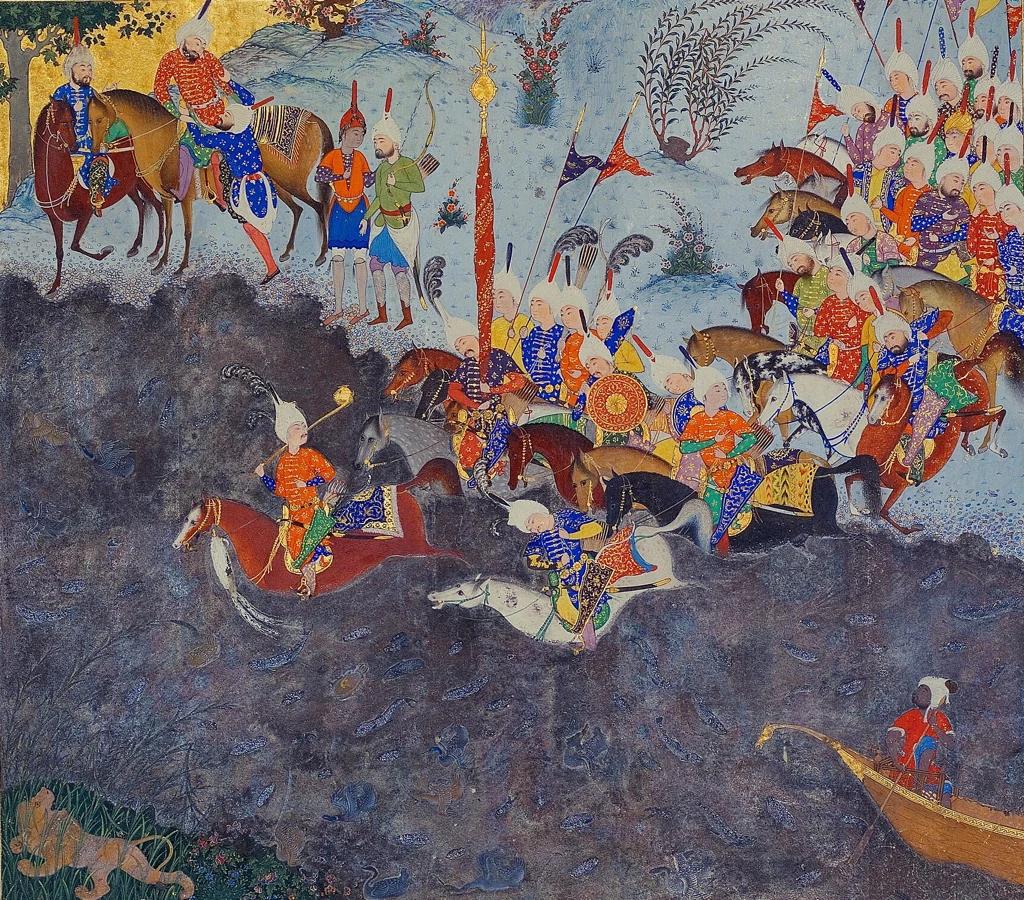
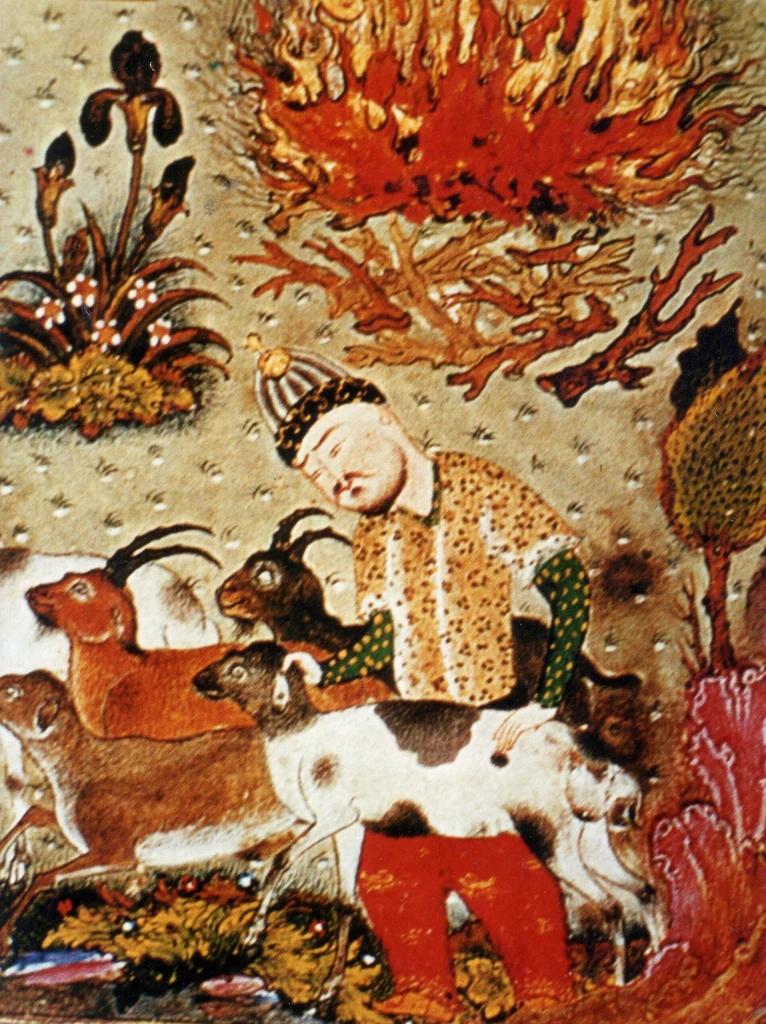
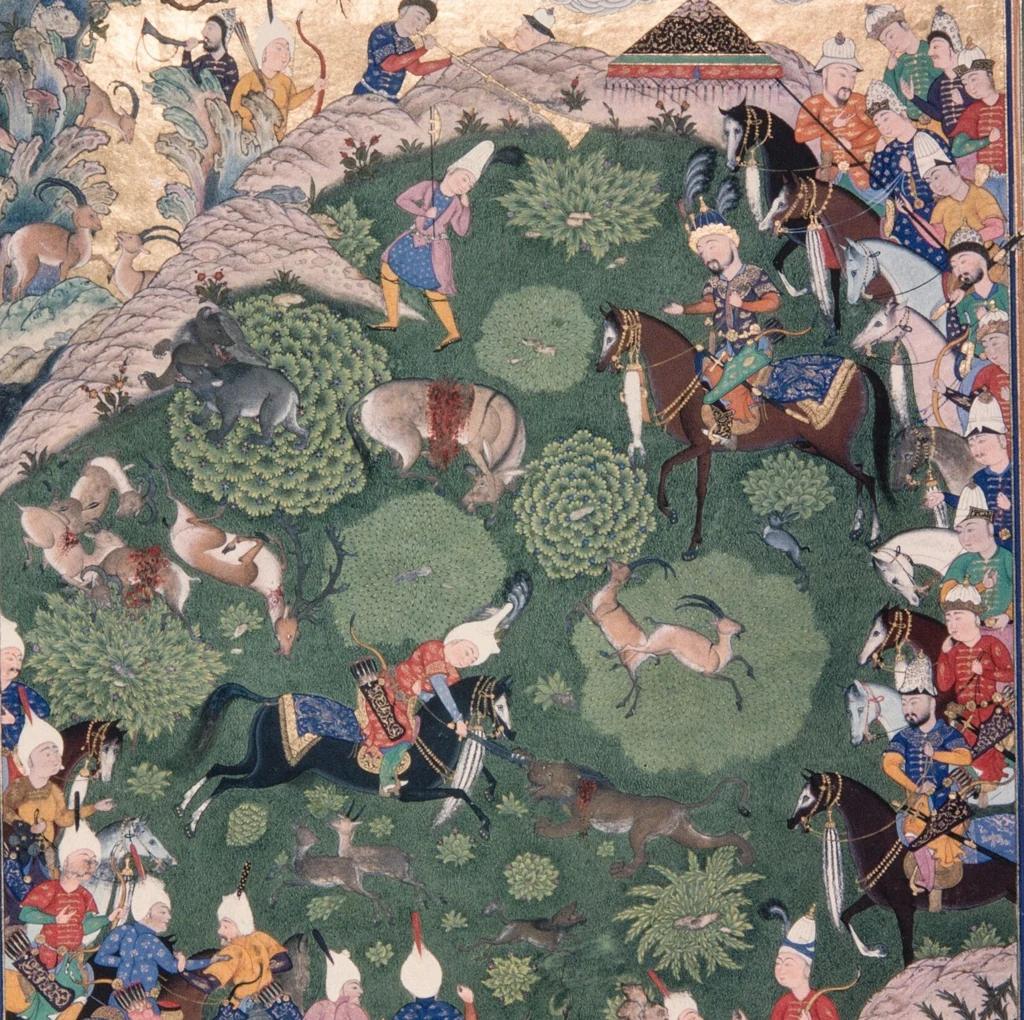
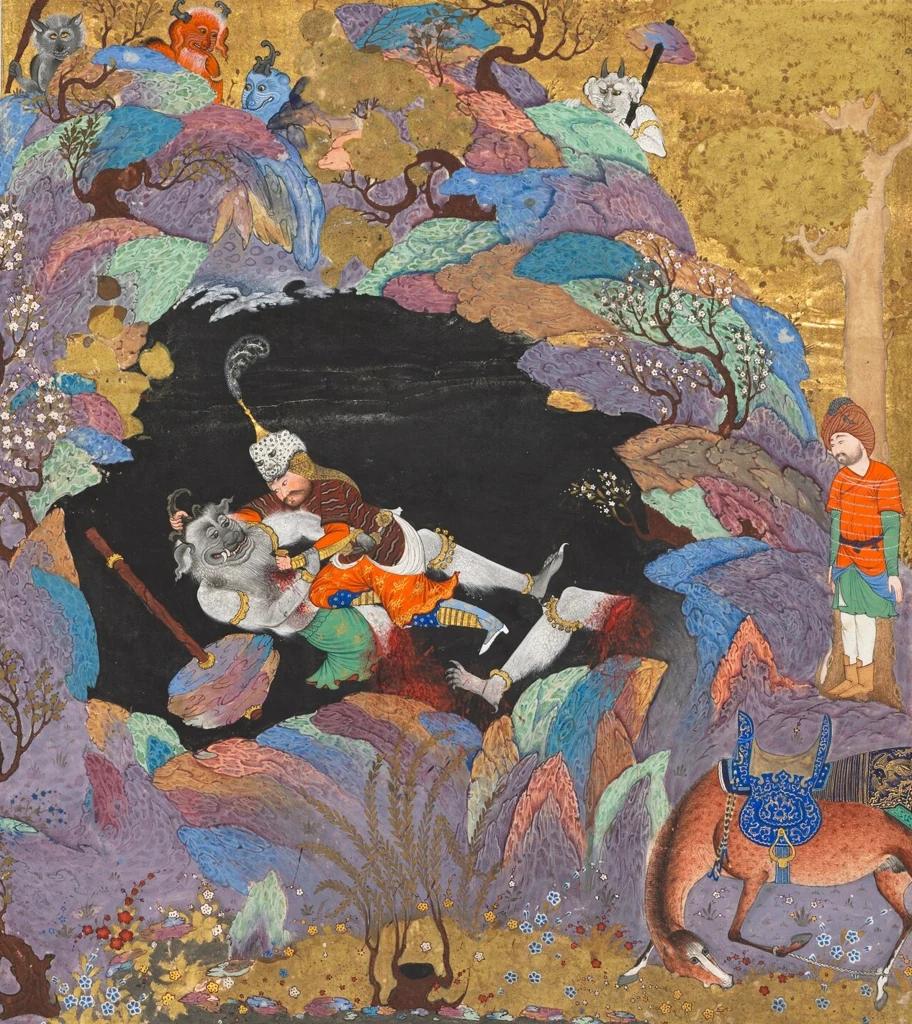
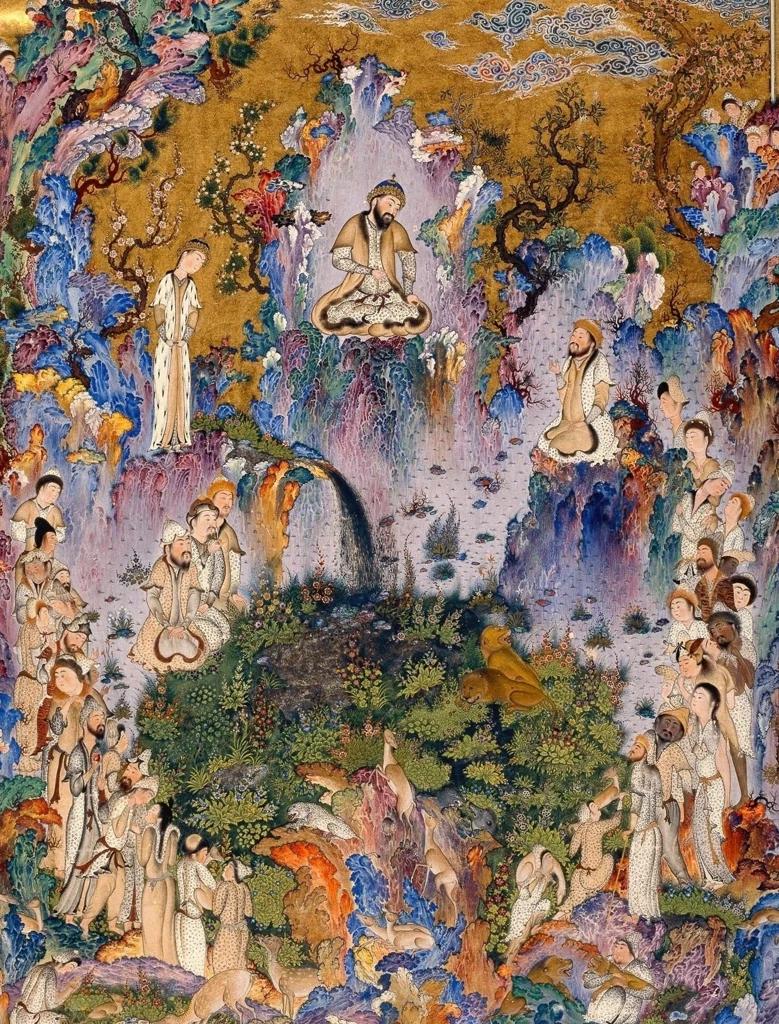
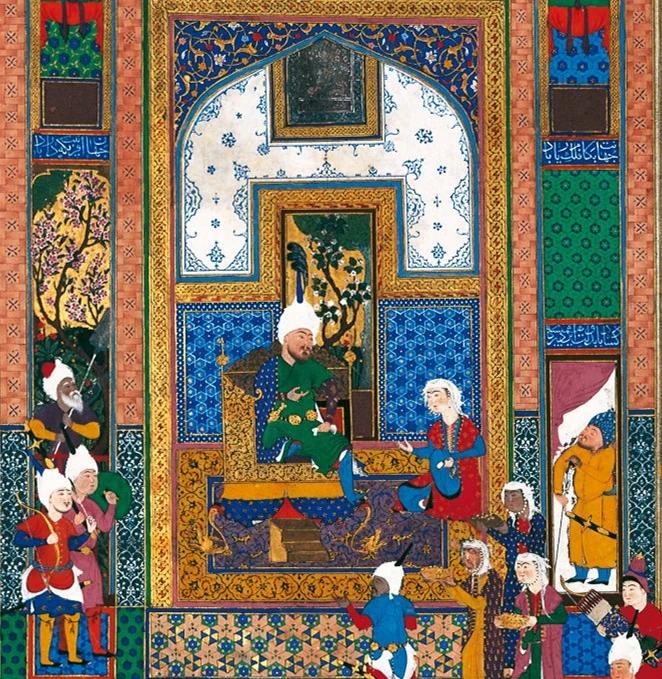
  We trained a style LoRA on 20 public-domain paintings from the 16th-century Shahnameh of Shah Tahmasp. Captions describe only the content and end with the trigger `shtm style`.

  Six of the 20 training images:

  <div style={{ display: "grid", gridTemplateColumns: "repeat(3, 1fr)", gap: "0.75rem" }}>
    <img src="https://cdn.sanity.io/images/2gpum2i6/production/61e926461f465b345e10c39f47be2ddff945c77e-662x679.webp" alt="Training image: A crowned ruler in a green robe sits on a throne inside an ornate tiled palace hall, attended by courtiers and guards while musicians sit in the foreground. In a narrow panel at the right, grooms and soldiers stand among horses and decorated elephants in a flowering landscape. shtm style" style={{ width: "100%", aspectRatio: "1 / 1", objectFit: "cover", display: "block", margin: 0, borderRadius: "0.5rem" }} />

    <img src="https://cdn.sanity.io/images/2gpum2i6/production/e84f2bb7af002737674465f4e34b487377645530-1024x900.webp" alt="Training image: A crowd of armored horsemen in bright coats and white turbans, carrying banners and a tall standard, ride their horses into a dark river. Two mounted men and two archers watch from the bank at upper left, a small figure sits in a boat at lower right, and a lion rests in the grass at lower left. shtm style" style={{ width: "100%", aspectRatio: "1 / 1", objectFit: "cover", display: "block", margin: 0, borderRadius: "0.5rem" }} />

    <img src="https://cdn.sanity.io/images/2gpum2i6/production/68638dfa534c27c0a0f0c2cf09d2da27eba18fea-766x1024.webp" alt="Training image: A man in a spotted yellow tunic, striped cap and red trousers stands among a herd of goats and antelope with curved horns. A large blaze of orange flames burns above him on a speckled ground, with an iris plant, a leafy tree and bright rocks around the edges. shtm style" style={{ width: "100%", aspectRatio: "1 / 1", objectFit: "cover", display: "block", margin: 0, borderRadius: "0.5rem" }} />

    <img src="https://cdn.sanity.io/images/2gpum2i6/production/f4aa3e5dd2c867754b9f8ab5b2b2828717fbaaf3-1024x1020.webp" alt="Training image: A mounted nobleman in a plumed turban sits on a brown horse on a green hillside while attendants and riders crowd along the right edge. Hunters on foot and horseback chase deer, wolves, foxes and other animals among round bushes and rocky ridges, with a tent at the top and onlookers gathered in the lower left. shtm style" style={{ width: "100%", aspectRatio: "1 / 1", objectFit: "cover", display: "block", margin: 0, borderRadius: "0.5rem" }} />

    <img src="https://cdn.sanity.io/images/2gpum2i6/production/6931762816576055c7d2c561373a668f1ee4bbf4-912x1024.webp" alt="Training image: An armored warrior in a plumed white helmet wrestles a gray horned demon inside a dark cave, with blood and a severed leg beside them. Colorful rocky hills with blossoming trees surround the cave, small demons watch from the ridge above, and a standing attendant and a saddled horse wait at the right. shtm style" style={{ width: "100%", aspectRatio: "1 / 1", objectFit: "cover", display: "block", margin: 0, borderRadius: "0.5rem" }} />

    <img src="https://cdn.sanity.io/images/2gpum2i6/production/b49e70400941d7aa2241d8c2cb3c6acf7d556738-779x1024.webp" alt="Training image: A bearded king sits cross-legged on a small round platform high on a rocky ledge beside a waterfall. Crowds of robed men and attendants gather on the hillsides below, and animals roam the green thicket in the foreground among twisting trees and flowering rocks. shtm style" style={{ width: "100%", aspectRatio: "1 / 1", objectFit: "cover", display: "block", margin: 0, borderRadius: "0.5rem" }} />
  </div>

  Example caption:

  <div className="not-prose lora-compare__prompt">
    <p className="lora-compare__prompt-text">A crowned ruler in a green robe sits on a throne inside an ornate tiled palace hall, attended by courtiers and guards while musicians sit in the foreground. In a narrow panel at the right, grooms and soldiers stand among horses and decorated elephants in a flowering landscape. shtm style</p>
  </div>

  Base vs. LoRA at step 1500, same prompt and seed.

  <LoraCompare
    items={[
{
base: "https://cdn.sanity.io/images/2gpum2i6/production/ced6e74a83be01977383c2eb93262d52b62bc743-880x1184.webp",
lora: "https://cdn.sanity.io/images/2gpum2i6/production/85d236669c3299457d60078ab5bf7a997a126427-880x1184.webp",
alt: "An old astronomer looking through a brass telescope in a tower room.",
prompt: "An old astronomer in a tower room looks through a large brass telescope at the night sky. shtm style"
},
{
base: "https://cdn.sanity.io/images/2gpum2i6/production/4c930aa494ddb28e3d55a7cac9ee3ca8638dbec6-1024x1024.webp",
lora: "https://cdn.sanity.io/images/2gpum2i6/production/6b496305f8991611c5ee07009a033992bfaa0345-1024x1024.webp",
alt: "A knight on a white horse riding through a pine forest toward a castle.",
prompt: "A knight on a white horse rides through a dark pine forest toward a distant castle on a hill. shtm style"
},
{
base: "https://cdn.sanity.io/images/2gpum2i6/production/042faf0478551d1e651703d3c50348db64fc252f-1024x1024.webp",
lora: "https://cdn.sanity.io/images/2gpum2i6/production/ef06ae77257e992951ee67174719f3cbd6f98ee0-1024x1024.webp",
alt: "A fox and a crow on a fallen tree under a full moon.",
prompt: "A fox and a crow sit on a fallen tree, talking, while a full moon rises behind them. shtm style"
},
{
base: "https://cdn.sanity.io/images/2gpum2i6/production/040f8a2aad88feb79a6b1b9f578c0fe913ad88e5-1184x880.webp",
lora: "https://cdn.sanity.io/images/2gpum2i6/production/c96bb201110540fd8ed6aedada7ce01f2db804c1-1184x880.webp",
alt: "A sailing ship in a storm with huge waves.",
prompt: "A sailing ship caught in a storm with huge waves and lightning over the sea. shtm style"
}
]}
  />

  ### Run a LoRA on Klein Distilled

  Klein Base and Klein Distilled share the same architecture, so a LoRA trained on Base loads into Distilled without any conversion. Train on Base, then generate with Distilled at 16 steps instead of 50.

  Keep Distilled's sampler settings and lower the LoRA scale slightly. In our tests 0.75 matched the Base + LoRA result most closely, and anything from 0.5 to 1.0 works.

  | Setting | Value |
  | - | - |
  | **Steps** | 16 |
  | **Guidance (CFG)** | 1 |
  | **LoRA scale** | 0.75 (0.5 to 1.0) |

  The style or edit comes through as strongly as on Base. Distilled renders the same seed differently, so expect small changes in details like a hair color or the phase of the moon, not in the style itself.

  Two style LoRAs trained on Base, run on Base at 50 steps and on Distilled at 16 steps. Same prompt and seed.

  <LoraCompare
    baseLabel="Base + LoRA"
    loraLabel="Distilled + LoRA"
    items={[
{
base: "https://cdn.sanity.io/images/2gpum2i6/production/752a044d5fb54c66586d8c4c2991c662d5dc0bc8-1024x1024.webp",
lora: "https://cdn.sanity.io/images/2gpum2i6/production/24ace5596fd568df6d506204ea440dd378421435-1024x1024.webp",
alt: "A knight on a white horse riding through a pine forest toward a castle, in Russian folk illustration style.",
prompt: "A knight on a white horse rides through a dark pine forest toward a distant castle on a hill. bilb style"
},
{
base: "https://cdn.sanity.io/images/2gpum2i6/production/c28a6500a3e32e0b9748bb09e40a813182f88d9e-1024x1024.webp",
lora: "https://cdn.sanity.io/images/2gpum2i6/production/5e96593689fa656a74376be6849471115c6e3f36-1024x1024.webp",
alt: "A striped lighthouse on a cliff with a rainbow beam across a starry sky.",
prompt: "ohwj style, a lighthouse on a cliff, vibrant medium. A tall striped lighthouse stands on a rocky cliff above swirling turquoise waves, its beam spreading into ribbons of color across a starry sky covered in dots and spirals. Seagulls with patterned wings circle the tower."
},
{
base: "https://cdn.sanity.io/images/2gpum2i6/production/5bdd31d3b7688ec112162bb1dd154c676698eed5-1024x1024.webp",
lora: "https://cdn.sanity.io/images/2gpum2i6/production/f189101b5dda912d5aa820b7a51fe0580ec649b4-1024x1024.webp",
alt: "An orange cat curled around a giant teacup, steam turning into birds.",
prompt: "ohwj style, a cat and a cup of tea, whimsical medium. A large orange cat with a coat of dots and swirls curls around a giant teacup on a patterned tablecloth, steam rising in spirals that turn into tiny birds."
}
]}
  />
</div>


This documentation is built and hosted on [Mintlify](https://mintlify.com), a developer documentation platform.