> ## Documentation Index
> Fetch the complete documentation index at: https://docs.bfl.ml/llms.txt
> Use this file to discover all available pages before exploring further.
# Train your first LoRA on FLUX 3 Image Klein
> Train a style LoRA on FLUX 3 Image Klein with AI Toolkit, from dataset and captions to picking a checkpoint, using a Halloween postcard LoRA as the example.
FLUX 3 Image Klein
# Train your first LoRA
A LoRA is a small add-on that steers an image model toward a specific style. You're going to train one that makes FLUX 3 Image Klein draw like a Halloween postcard from the early 1900s. Swap in your own images, and the same steps work for any style.
> [!TIP]
>
> Want a card without training? [Make a Halloween card on Hugging Face](https://huggingface.co/spaces/maanavdalal/flux3-klein-halloween-card).
## What you'll make
Asking the base model (FLUX 3 Image Klein) for "an old Halloween greeting card" already does great. It just doesn't have the vintage postcard style from old movies. The trained LoRA is much closer to that look:
## What you need
* A GPU with at least 24 GB of VRAM.
* [AI Toolkit](https://github.com/ostris/ai-toolkit) by ostris.
* Access to [FLUX 3 Image Klein Base on Hugging Face](https://huggingface.co/black-forest-labs/flux-3-image-klein-base). Once you have access, log in with `hf auth login`.
* A dataset you want to train the model on. [Here's the one this guide uses](https://github.com/MaanavD/flux3-klein-lora-guide/tree/main/halloween).
```bash theme={null}
git clone https://github.com/ostris/ai-toolkit.git
cd ai-toolkit
python3 -m venv venv && source venv/bin/activate
# AI Toolkit's tested PyTorch build for CUDA 13.0 (use another index URL for older drivers):
pip install --no-cache-dir torch==2.13.0 torchvision==0.28.0 torchaudio==2.11.0 --index-url https://download.pytorch.org/whl/cu130
pip install -r requirements.txt
python -c "import torch; print(torch.cuda.is_available())" # should print True
hf auth login
```
## 1. Gather your dataset
This dataset has 65 Halloween postcards, some from [The Public Domain Review](https://publicdomainreview.org/collection/halloween-postcards/) and some from Wikimedia Commons. A `metadata.csv` lists each image's source and license, which is standard practice if you plan to share your LoRA.
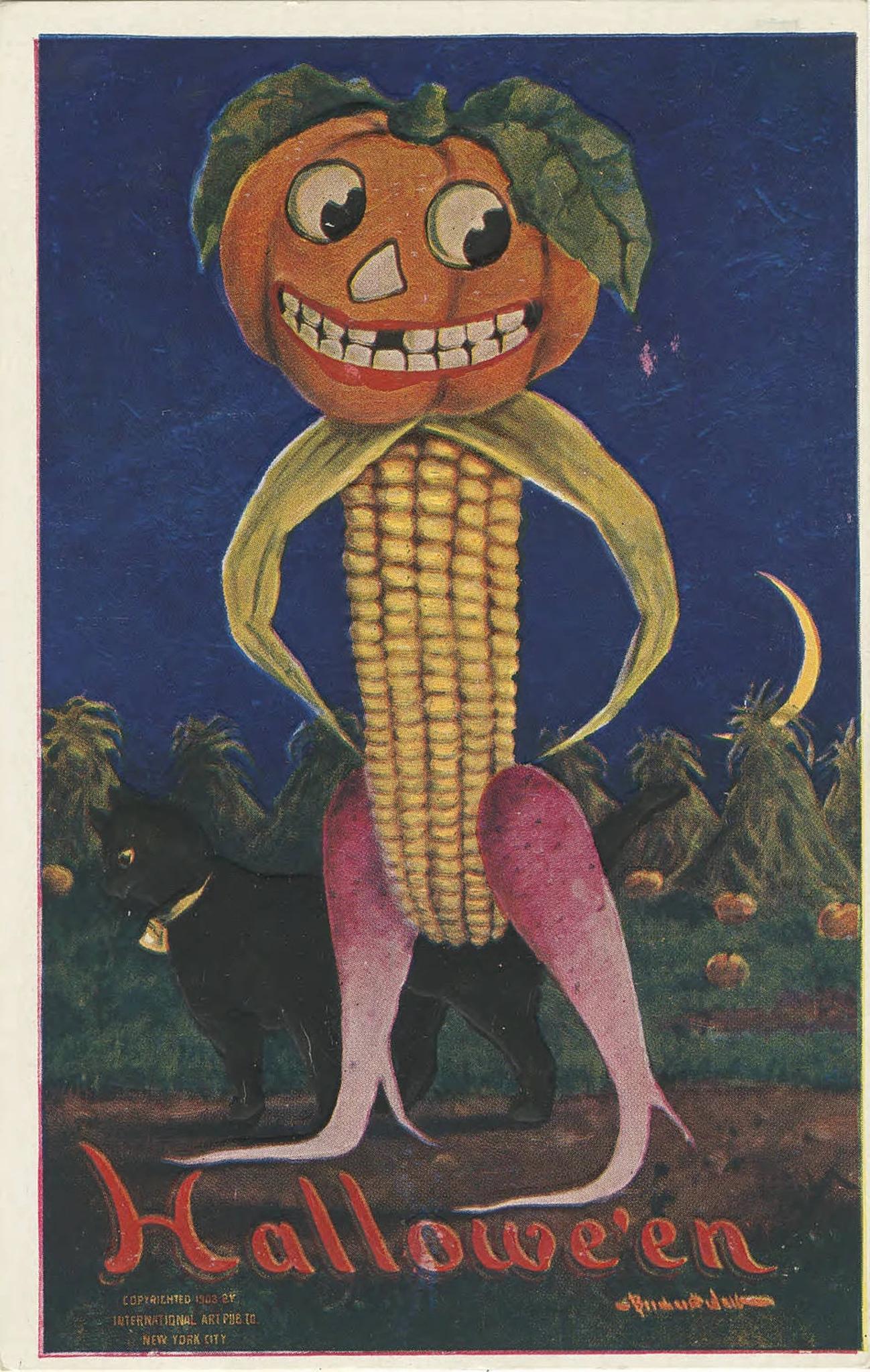
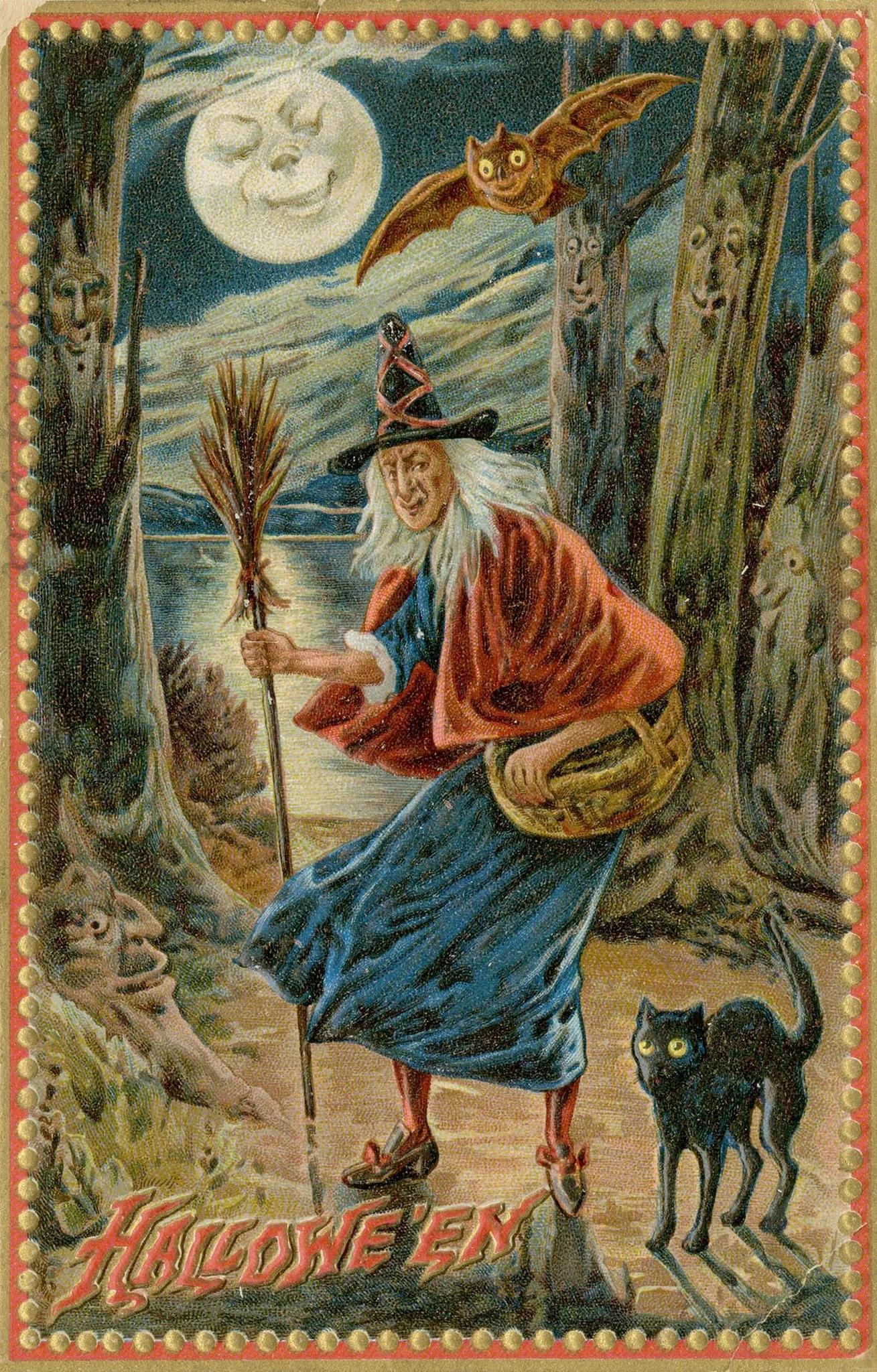
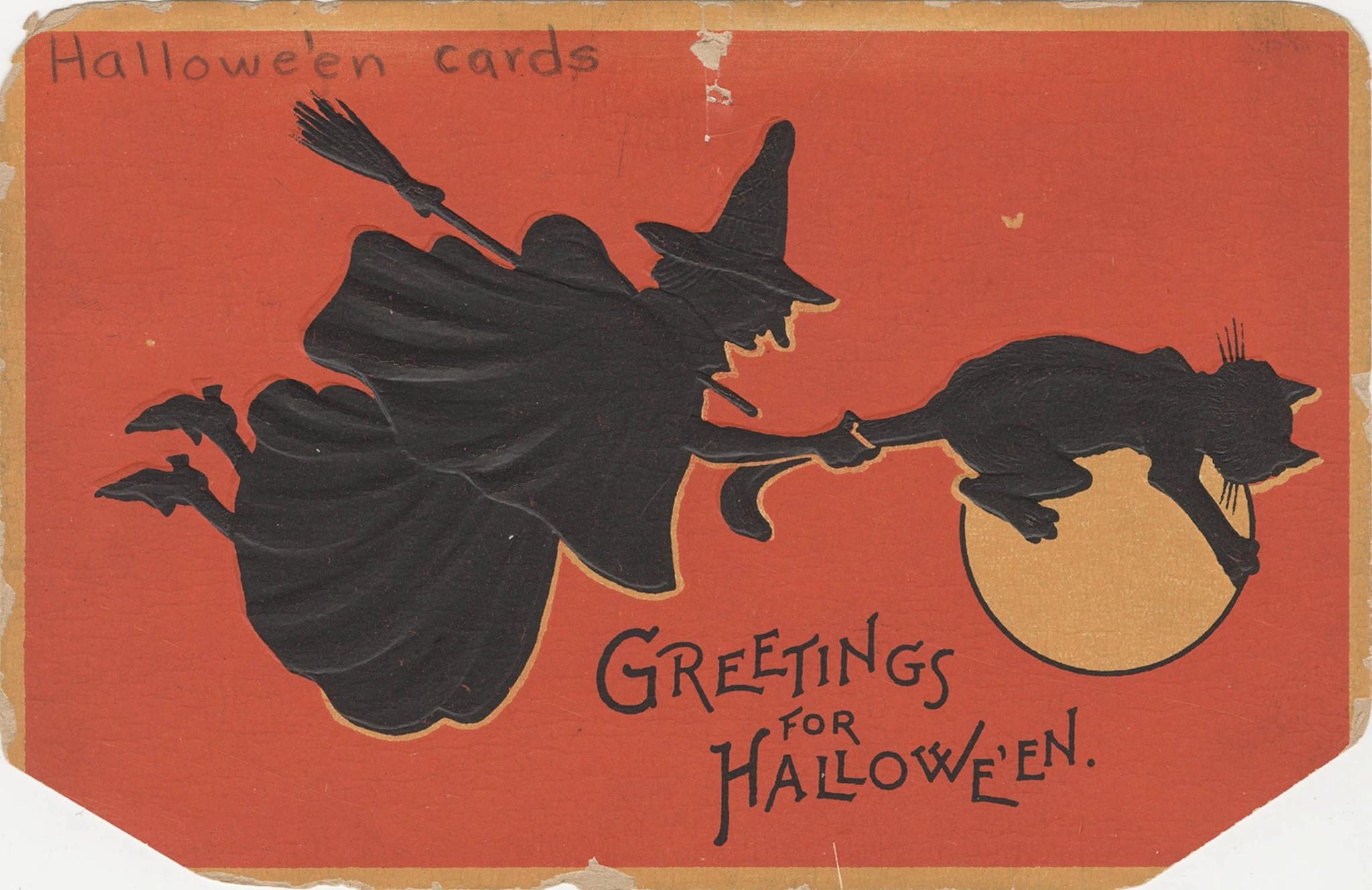
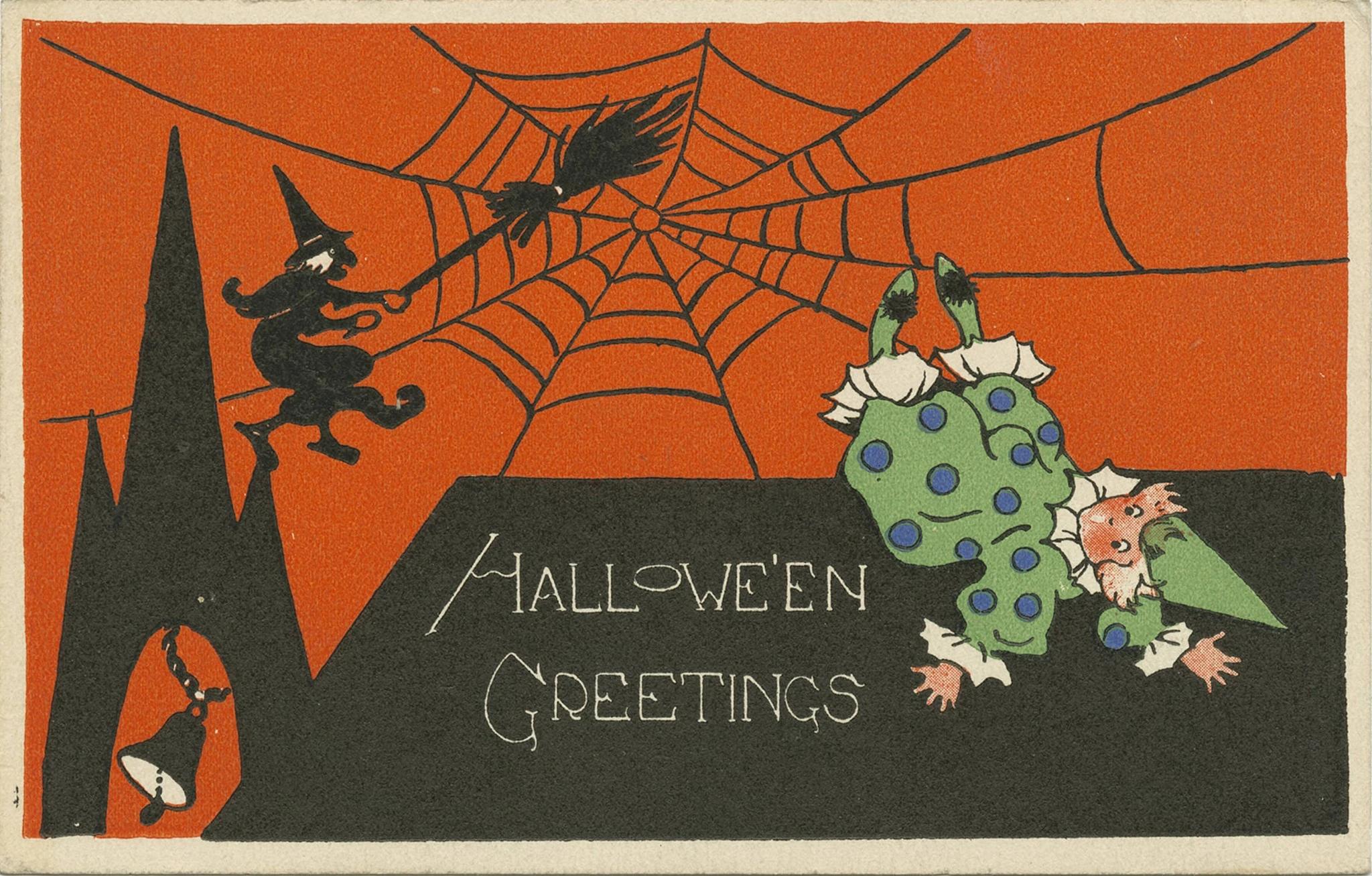
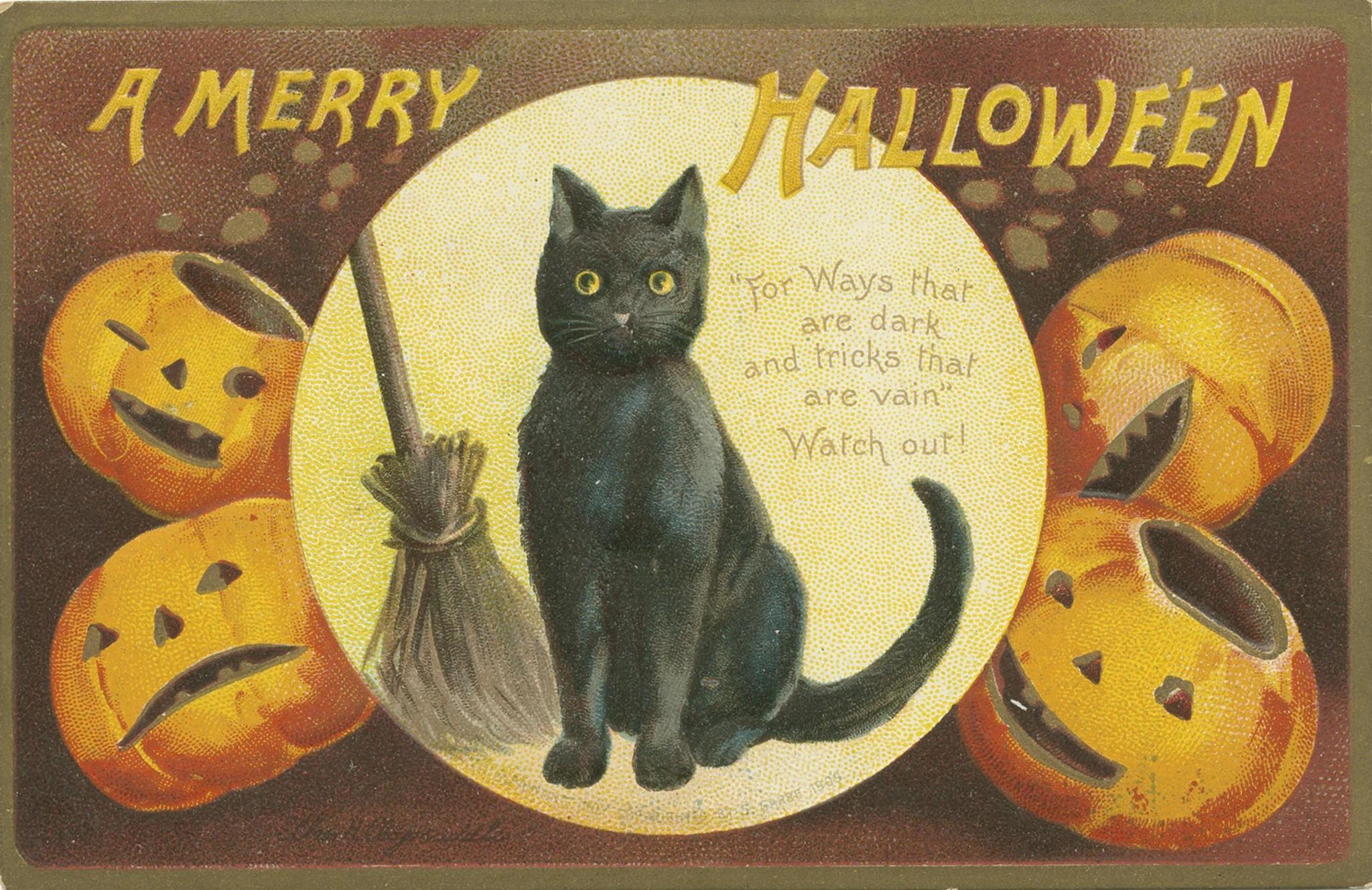
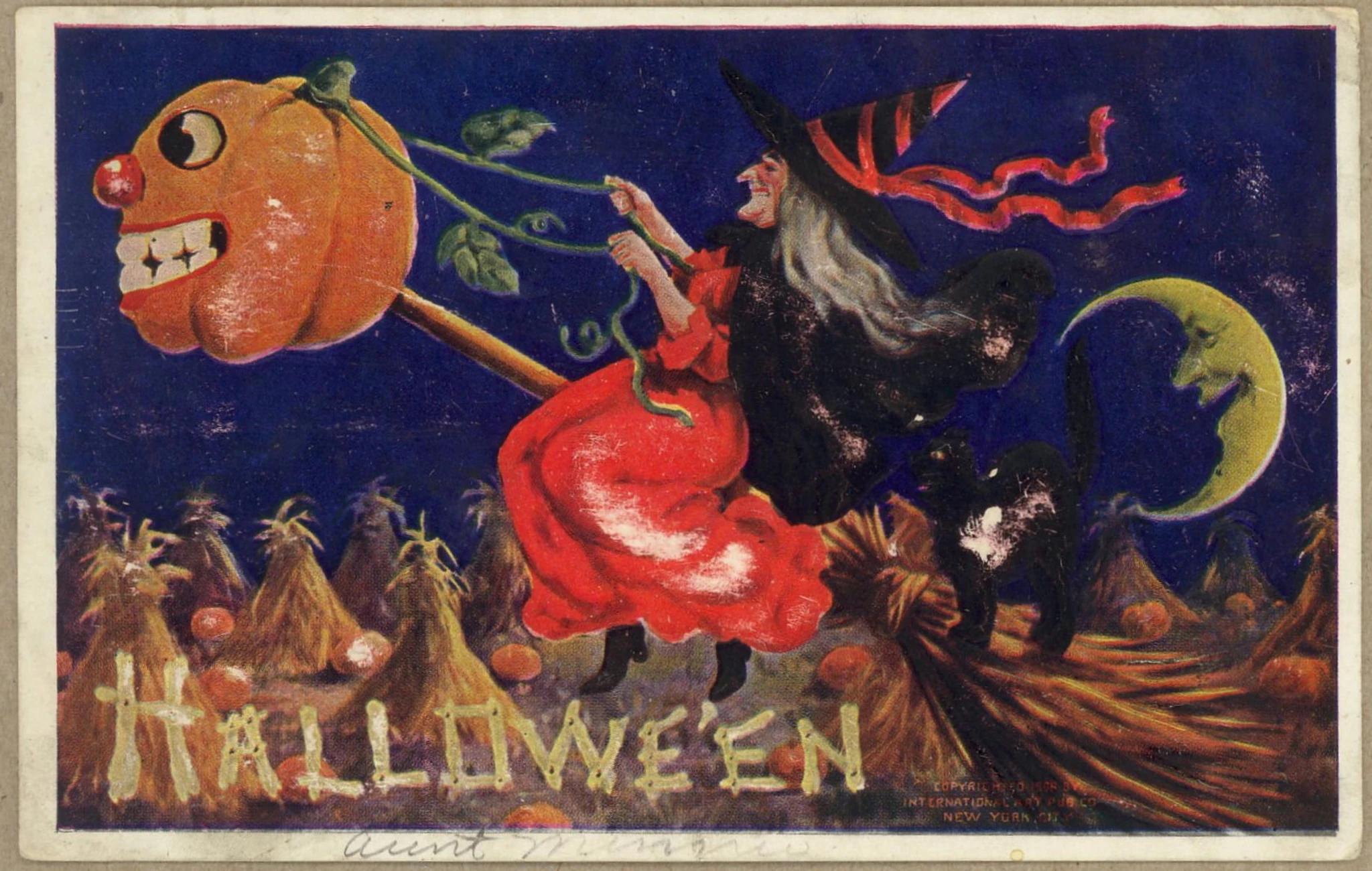
Six of the 65 training cards.
Your images can be different sizes and shapes, and you don't need to crop them. Give them simple numbered names, like `halloween_postcards_0001.jpg`. Each caption below uses the same schema.
Look over your data before you train. Public sets often have the wrong images mixed in, and anything you leave in shows up in the LoRA. With a small dataset every image counts, so keep the data you have high quality.
## 2. Caption your images
Captions give the model clear context on what's in each image. Describe what's pictured: the people, objects, actions and setting. Leave the style out, because that's what the LoRA learns.
Write the captions yourself or have a model write them. Models are good at it, but read what they write before you train. If you write them by hand, say where things sit in the picture, like top left or bottom right.
### The trigger word
Every caption starts with a trigger word. During training, anything the captions don't name ends up tied to that word, which here is the old postcard look. After training, you put the trigger word in a prompt to invoke the LoRA.
Avoid real words in your trigger. `pdhalloween` as a trigger word illustrates this well: the model could read "halloween" inside it, so it added Halloween things on its own. At step 0, before any training, it put a "Halloween" badge and a jack-o-lantern into a Christmas card. By step 4,000 it printed PDHALLOWEEN as a heading.

Step 0, `pdhalloween` added

Step 4,000, no trigger in the prompt
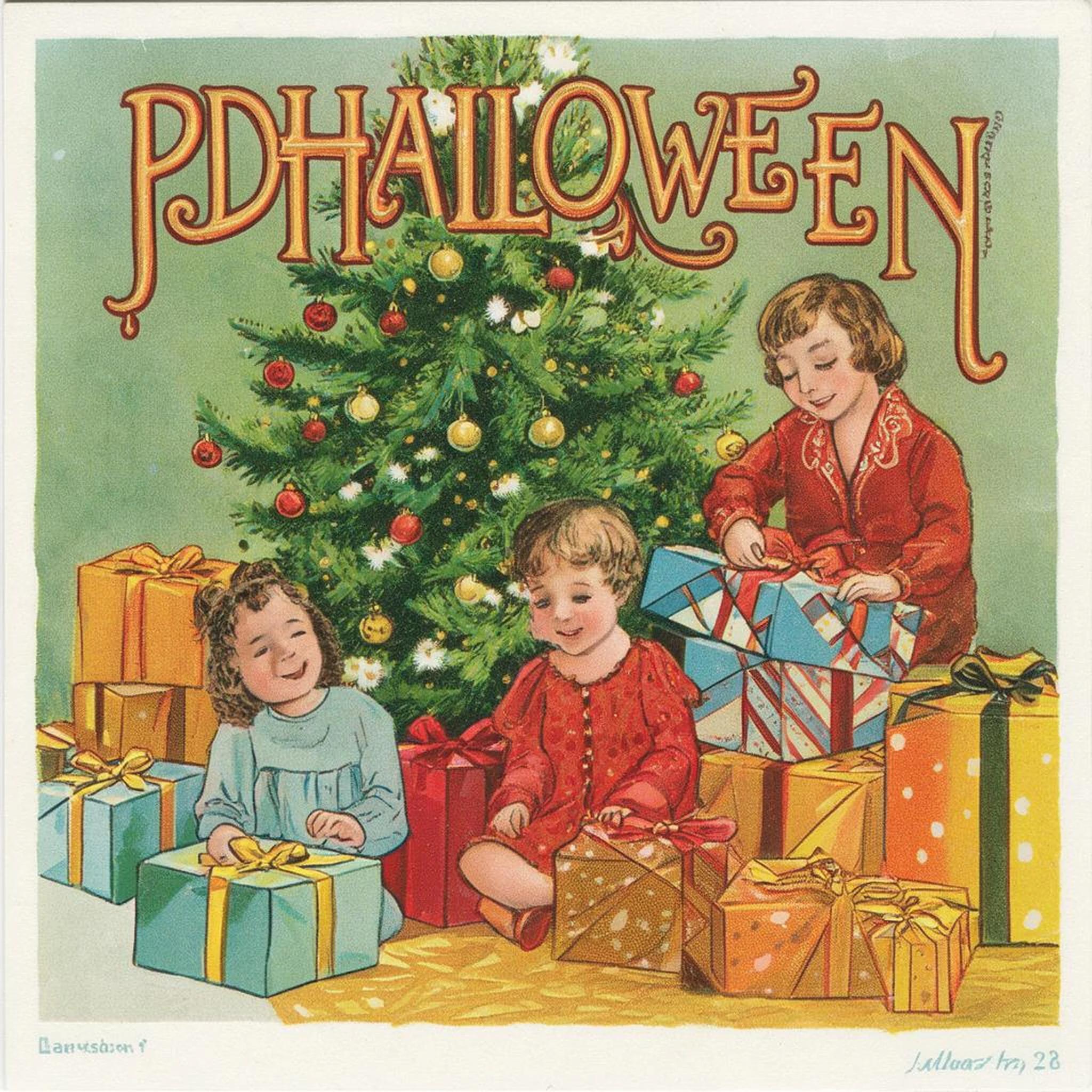
Step 4,000, `pdhalloween` added
Prompt: "an illustrated postcard of a family sitting beside a Christmas tree opening presents", seed 42, first run.
A word with no inherent meaning won't add anything by accident, so use something like `vqx` instead. Technically every word means something to a model, but short, consistent gibberish is the usual choice; AI Toolkit's examples use triggers like `p3r5on`. Before you train, put your trigger in a prompt on the base model. If the picture changes, pick another word.
### Writing the captions
Each image gets a text file with the same name that contains its caption. Both go in one folder, and the config points at that folder.
```text theme={null}
halloween/ # folder_path points here
├── halloween_postcards_0001.jpg # image
├── halloween_postcards_0001.txt # its caption
├── halloween_postcards_0002.jpg
├── halloween_postcards_0002.txt
└── … 65 images, 65 captions
```
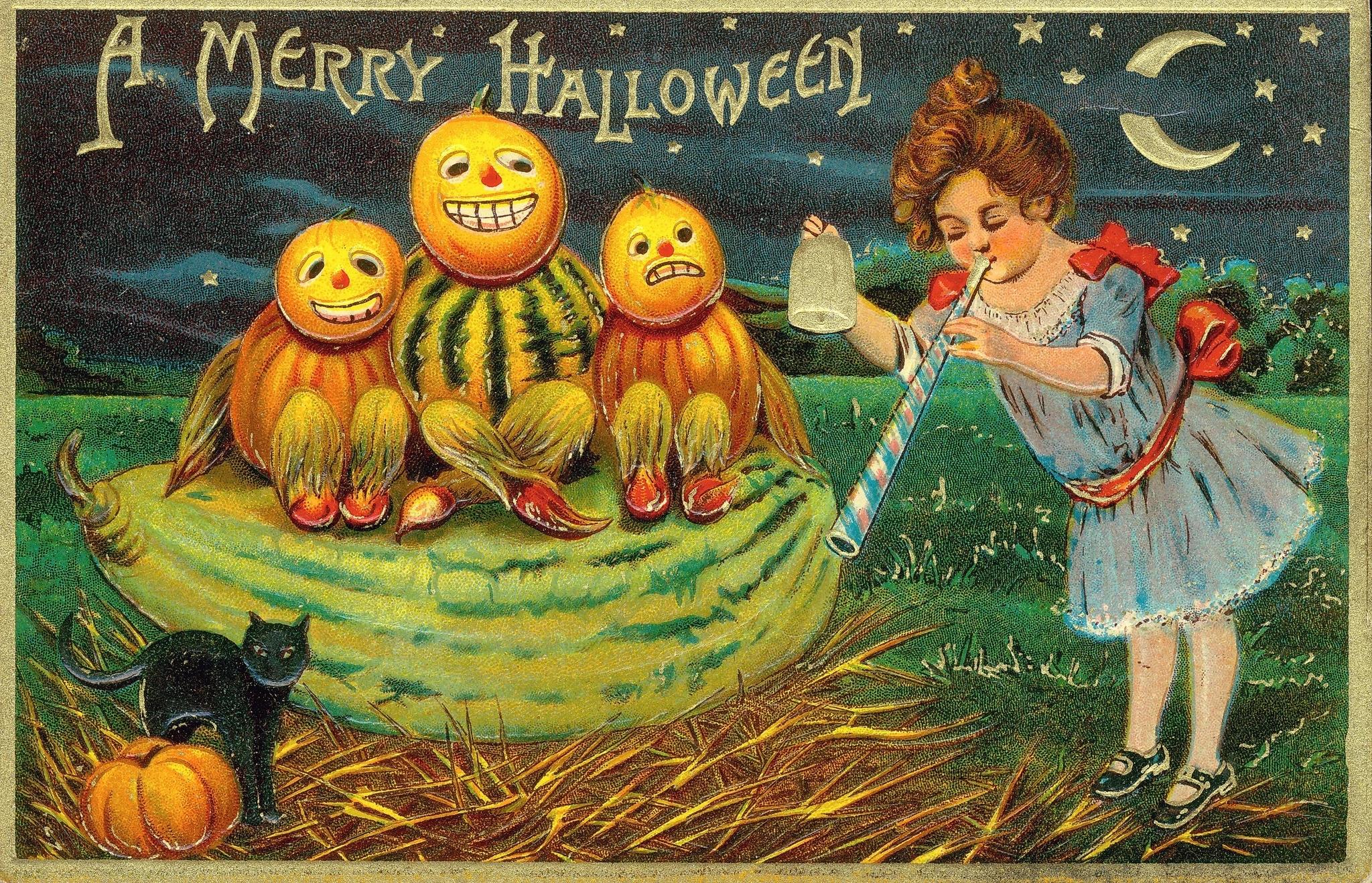
```text halloween_postcards_0001.txt wrap theme={null}
vqx three pumpkin-like figures on a squash, small black cat beside a pumpkin in the bottom left corner, a girl on the right side blowing a streamer with "A Merry Halloween" in the top left with a starry sky
```
In the config: `folder_path: /path/to/halloween`
AI Toolkit can also read one JSON file that maps each image path to its caption, set as `folder_path`. This guide uses `.txt` files, but one JSON file is probably easier to manage, and easier for a model to write if you have one help with captions.
The captions don't use words that describe the style, like "vintage" or "postcard". Instead they describe the objects in the image, and the trigger word absorbs the look. Here's how that works:
What vqx learns
Pick a caption · ← →
Real caption
* style words (what if)
Trigger word only
Caption
\`**vqx**, a witch
riding a broomstick with a black cat
**vqx**, a witch
riding a broomstick with a black cat,
vintage postcard
**vqx**\`

Simplified illustration of what captions can teach.
named in the
caption: that word helps explain it
not named: vqx
can learn it
vqx learns
**The postcard look.** The caption names the witch, broom and
cat, so vqx can learn the lettering, colors and paper.
“vqx, a fox” can then draw a fox in that look.
**Less of the look.** What if you add “vintage postcard”?
Those words could explain more of the look, leaving less for vqx.
**The look and more of the picture.** With no other words,
vqx may learn the witch, broom and cat too. “vqx, a fox”
may bring them along.
**Fig 1.** Switch between the three captions to see which parts of the card the trigger word absorbs.
If a card has words printed on it, put them in the caption.
## 3. Set up the config
Most of AI Toolkit's defaults work great. Here are the settings you'll change, and why.
### Rank: how big the LoRA is
Rank sets the size of the LoRA. Think of Klein as a textbook and your LoRA as sticky notes on its pages. Training a LoRA leaves the textbook alone and only writes the notes. Rank is how big the note on each page is: bigger notes can hold more changes, and make a bigger file.
Use rank 32. It's only 161 MB and about 80 million weights, really small next to Klein's 5.6 billion.
LoRA rank
Rank · ← →

## Klein is the textbook. Your LoRA is the sticky notes.
Trained on 65 postcards like this. Same prompt, before and
after.
Klein alone: step 0 sample
Klein alone
step 0 sample
*
What your notes change
What your notes change
\=
With your notes
With your notes
Rank
4
8
16
32
64
128
size of each note
Strength
0
1
0 = plain Klein
Saved file
· of Klein's 11.1
GB
**Fig 2.** Pick a rank to see how the file size changes, and set strength to 0 to see Klein without the LoRA.
### Learning rate and schedule
The learning rate is how much the LoRA changes on each training step. Keep it at `1e-4`, a standard value. The schedule changes the learning rate over the course of the run, and Fig 3 compares five of them. The [Klein recipe](https://docs.bfl.ml/flux_3/flux3_image_klein.md#training-config) uses `constant_with_warmup`, a short warmup and then a constant rate, and that was one of our favorites. `cosine` was the other.
## What the learning-rate schedule changes
Five `lr_scheduler` settings at lr `1e-4`. This figure: 1,000
steps, checkpoints every 250. The guide: 4,000 steps, saves every 100.
Learning rate schedule
### Learning rate at each step
Scroll charts sideways on a phone.
### Cumulative learning rate
Running total of the learning rate, as a share of what
`constant` reaches by step 1,000. This is not weight
distance: AdamW updates also depend on gradients.
### Cumulative learning rate between checkpoints
Numbers: share of constant's total. Full bar: the largest 250-step
total across all five schedules. Compare checkpoint images to judge
how much they change.
Cumulative learning rate by step 1,000: of constant.
**Fig 3.** Click each of the five `lr_scheduler` settings to see its learning rate at each step and how much the late checkpoints still change.
### Timesteps: how much noise to train on
Each training step adds noise to an image and asks the model to take it out. `timestep_type` decides how much noise. AI Toolkit's default, `sigmoid`, mostly practices on medium noise. Klein's sampler spends about half its steps at very high noise, and `timestep_type: shift` trains there about as often.
Use `timestep_type: shift`. It has the biggest effect of any setting here: the witch prompt looked like a printed card by step 300. If your samples barely change after a few hundred steps, check this setting first.
### Steps: how long to train
Train the full 4,000 steps from the Klein recipe, and save every 100 so you can compare. Our favorites were at 2,000, but some runs looked good at 4,000 too, so judge your own. Between 2,000 and 4,000 the changes get smaller.
Dataset **size matters**. This one has 65 images. With a much bigger set, each image comes up less often in the same number of steps, so you may want to train longer.
### Everything else
The rest are AI Toolkit defaults or settings that keep memory down: the AdamW optimizer, batch size 1, 1024 px, bf16, gradient checkpointing and latents cached to disk. They're all in the config below, which is also in the [repo](https://github.com/MaanavD/flux3-klein-lora-guide/tree/main/configs) with the `constant_with_warmup` version next to it.
> **The full config (cosine), with placeholder paths**
>
> ```yaml halloween-lora.yaml theme={null}
> job: extension
> config:
> name: halloween-lora
> process:
> - type: diffusion_trainer
> training_folder: /path/to/output
> device: cuda:0
> network:
> type: lora
> linear: 32
> linear_alpha: 32
> save:
> dtype: bf16
> save_every: 100
> max_step_saves_to_keep: 100
> datasets:
> - folder_path: /path/to/halloween
> caption_ext: txt
> resolution:
> - 1024
> cache_latents_to_disk: true
> train:
> batch_size: 1
> steps: 4000
> lr: 1e-4
> optimizer: adamw
> optimizer_params:
> betas:
> - 0.9
> - 0.95
> lr_scheduler: cosine
> # for warmup, then constant, use these instead
> # lr_scheduler: constant_with_warmup
> # lr_scheduler_params:
> # num_warmup_steps: 200
> noise_scheduler: flowmatch
> gradient_checkpointing: true
> dtype: bf16
> timestep_type: shift
> model:
> name_or_path: black-forest-labs/flux-3-image-klein-base
> arch: flux3
> sample:
> sampler: flowmatch
> sample_every: 100
> width: 1024
> height: 1024
> seed: 42
> walk_seed: false
> guidance_scale: 3.5
> sample_steps: 30
> neg: '' # leave as empty text
> samples:
> - prompt: a black cat sitting beside a glowing jack-o-lantern under a full moon
> seed: 42
> - prompt: vqx, a black cat sitting beside a glowing jack-o-lantern under a full moon
> seed: 42
> - prompt: vqx, a witch riding a broom above a small village under a crescent moon
> seed: 42
> - prompt: vqx, a small friendly robot trick-or-treating with a pumpkin candy bucket
> seed: 42
> - prompt: vqx, an illustrated postcard of a family sitting beside a Christmas tree opening presents
> seed: 123
> ```
## 4. Train and watch the samples
Save the config as `halloween-lora.yaml`, then run it from the `ai-toolkit` folder with the venv active:
```bash theme={null}
python run.py /path/to/halloween-lora.yaml
```
Do a 50-step smoke test first (`steps: 50`, `save_every: 25`, `sample_every: 25`) to make sure everything works as expected. It shouldn't take longer than 15 to 20 minutes.
### Test questions
The preview prompts in the config are your test questions. With `sample_every` matching `save_every`, every checkpoint comes with an image for each one (using the same seed), so you can compare checkpoints fairly. Ours covered:
* a control without the trigger (the cat prompt without `vqx`)
* scenes close to the cards (black cat, witch)
* a subject the cards never show (a robot)
* the Christmas postcard with and without `vqx`, at two seeds, to catch the trigger leaking
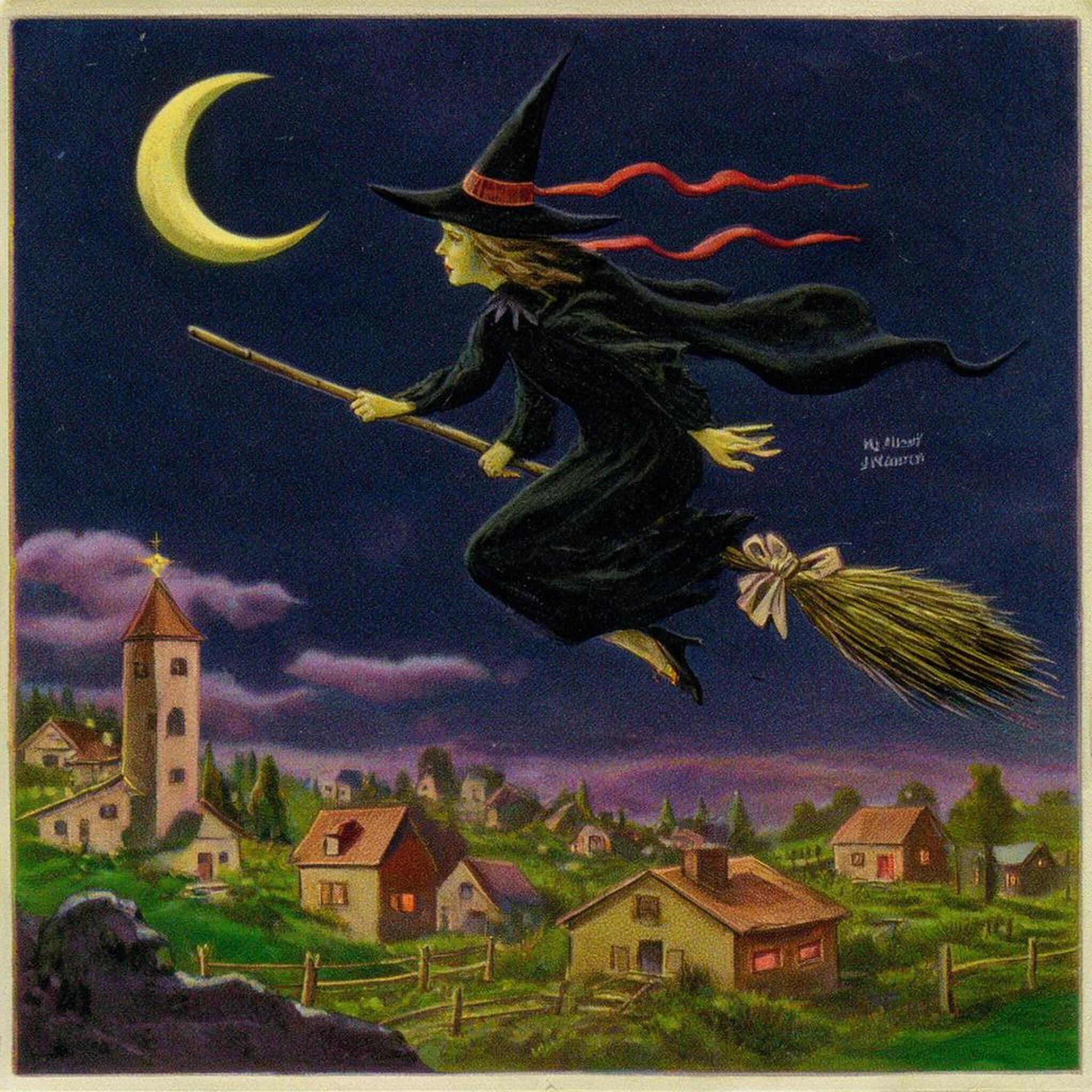
Here's the witch prompt at a few steps:
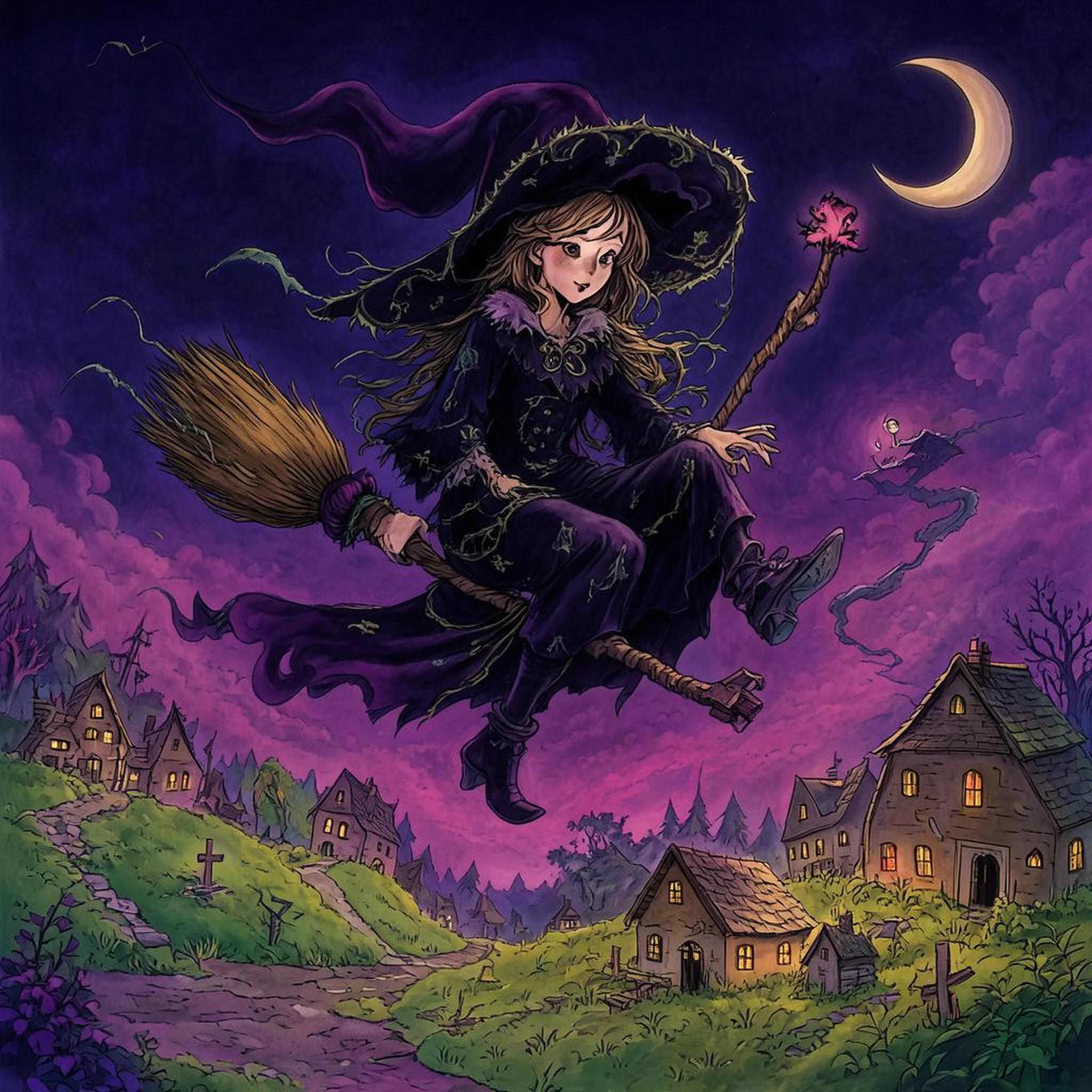
Step 0
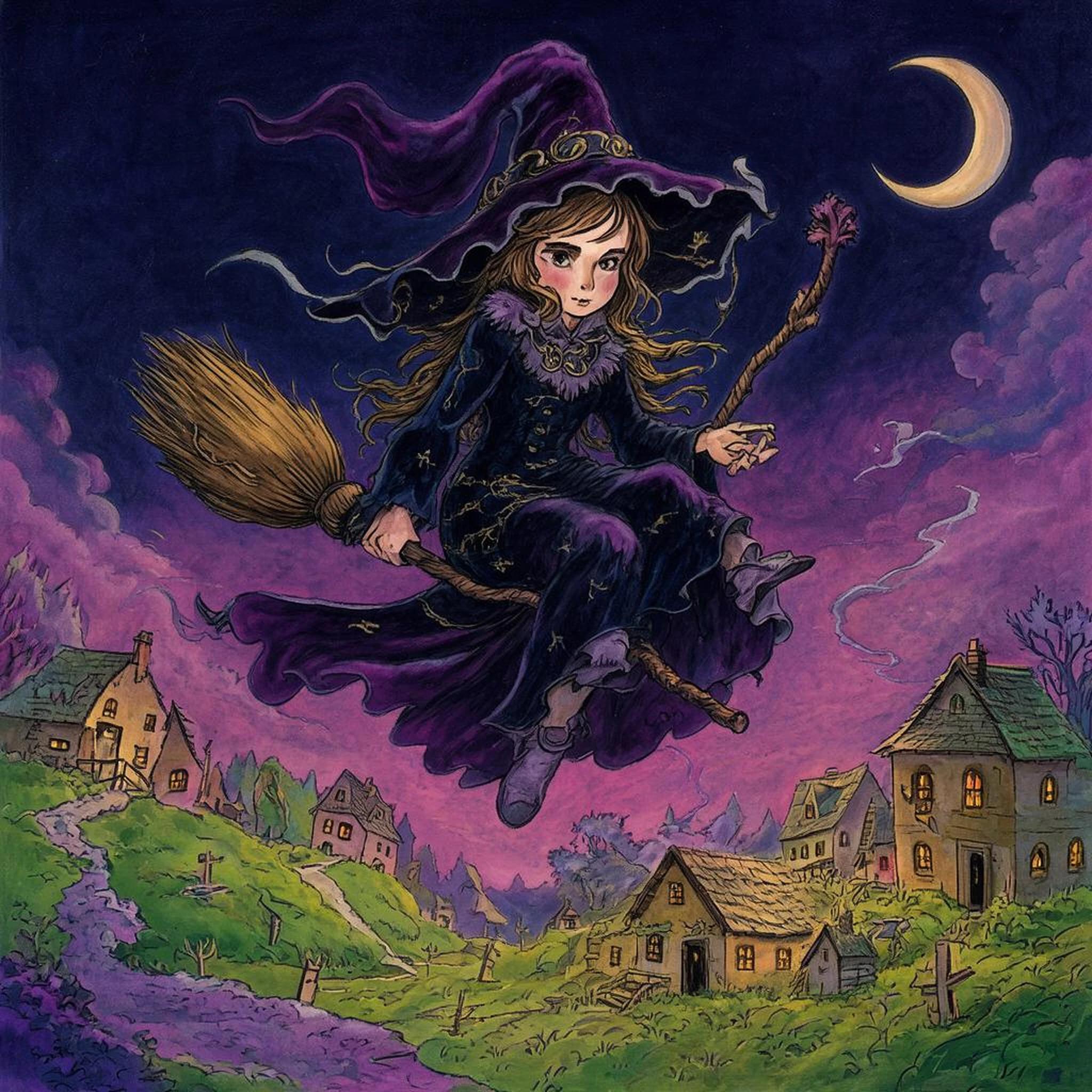
Step 100
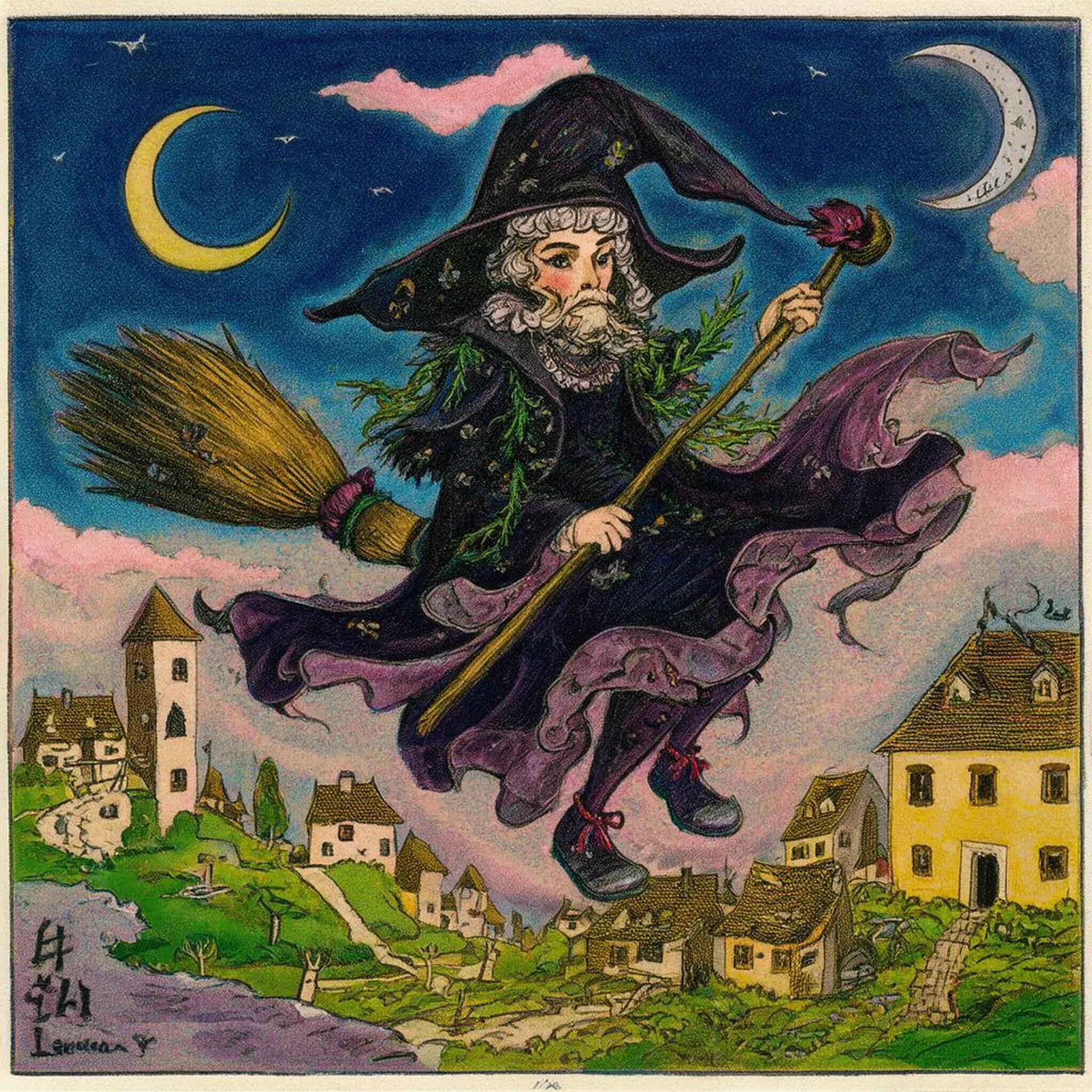
Step 300
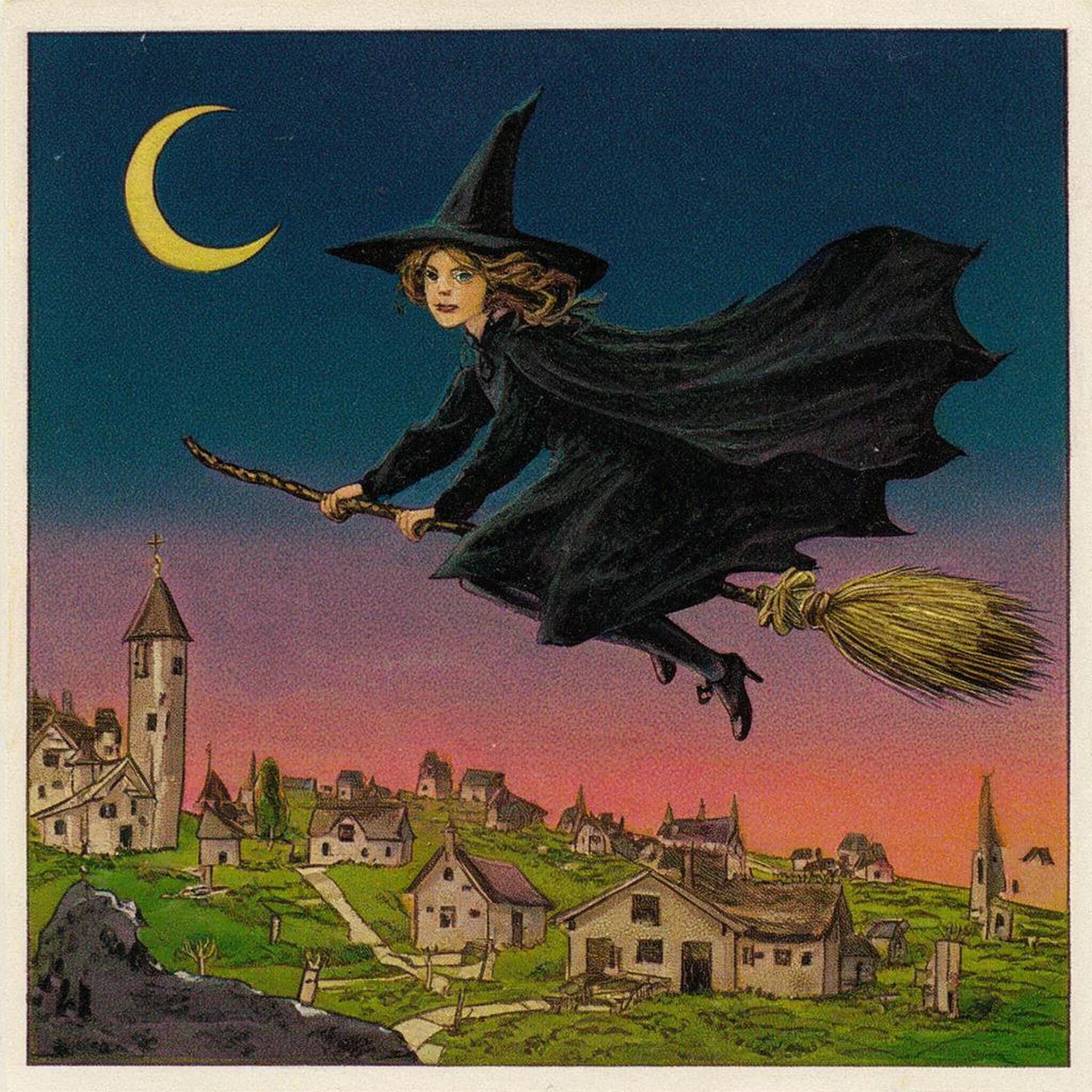
Step 1,000
Step 2,000
"vqx, a witch riding a broom above a small village under a crescent moon", seed 42, cosine run.
* Step 0 is the base model: a glossy purple witch.
* Step 100 barely changes.
* Step 300 already reads as a printed card, with a border.
* Steps 1,000 and 2,000 settle into flat printed color.
Your outputs will be in `/path/to/output/halloween-lora/`: a checkpoint every 100 steps, and the preview images in `samples/`. Open them up and judge them by eye.
## 5. Pick a checkpoint
Training doesn't head toward one right answer. Each checkpoint has learned a bit more from your images, and past some point it learns them too well: it overfits, copying details from your training cards instead of just the style. Saving checkpoints along the way lets you see what each one generates and pick the one you like.
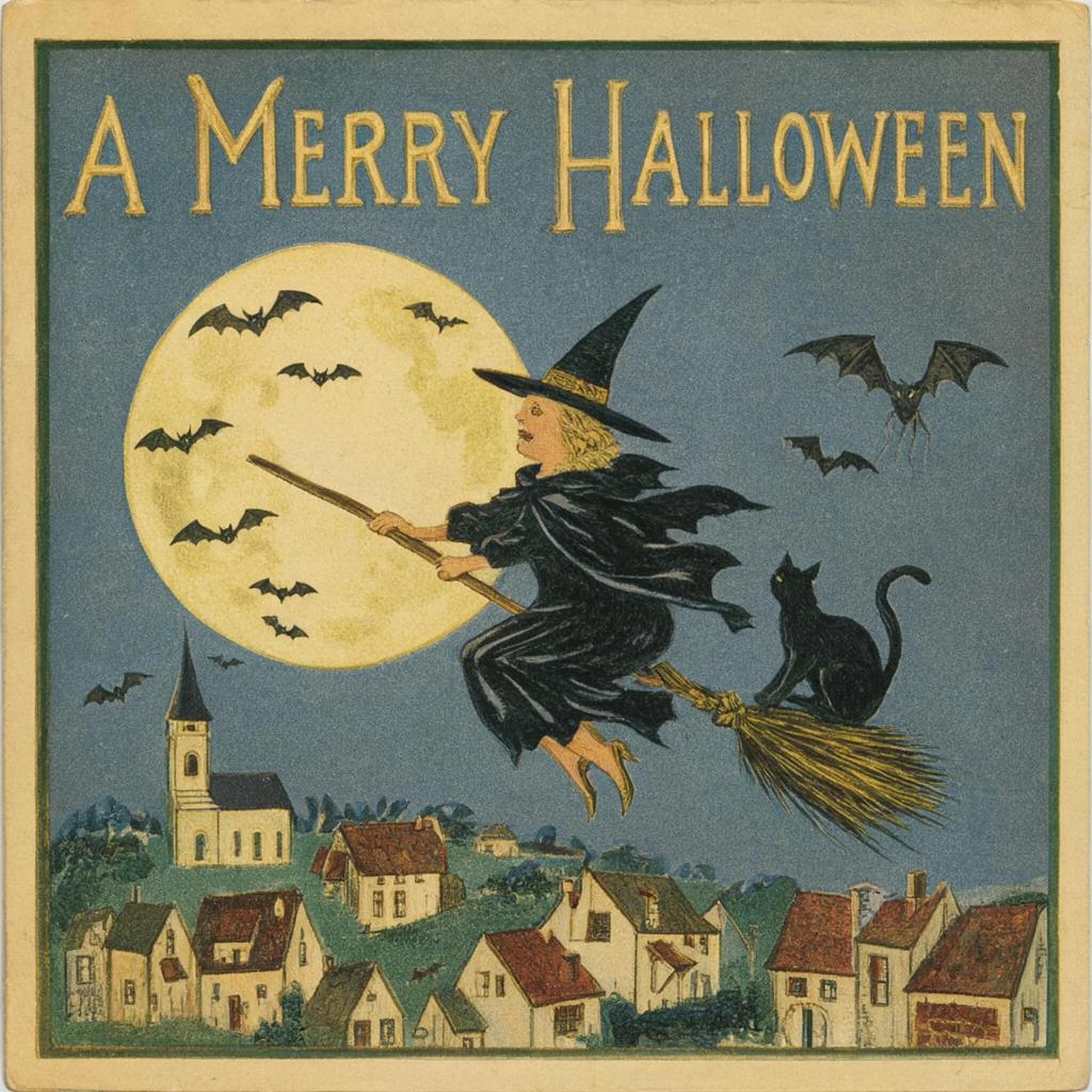
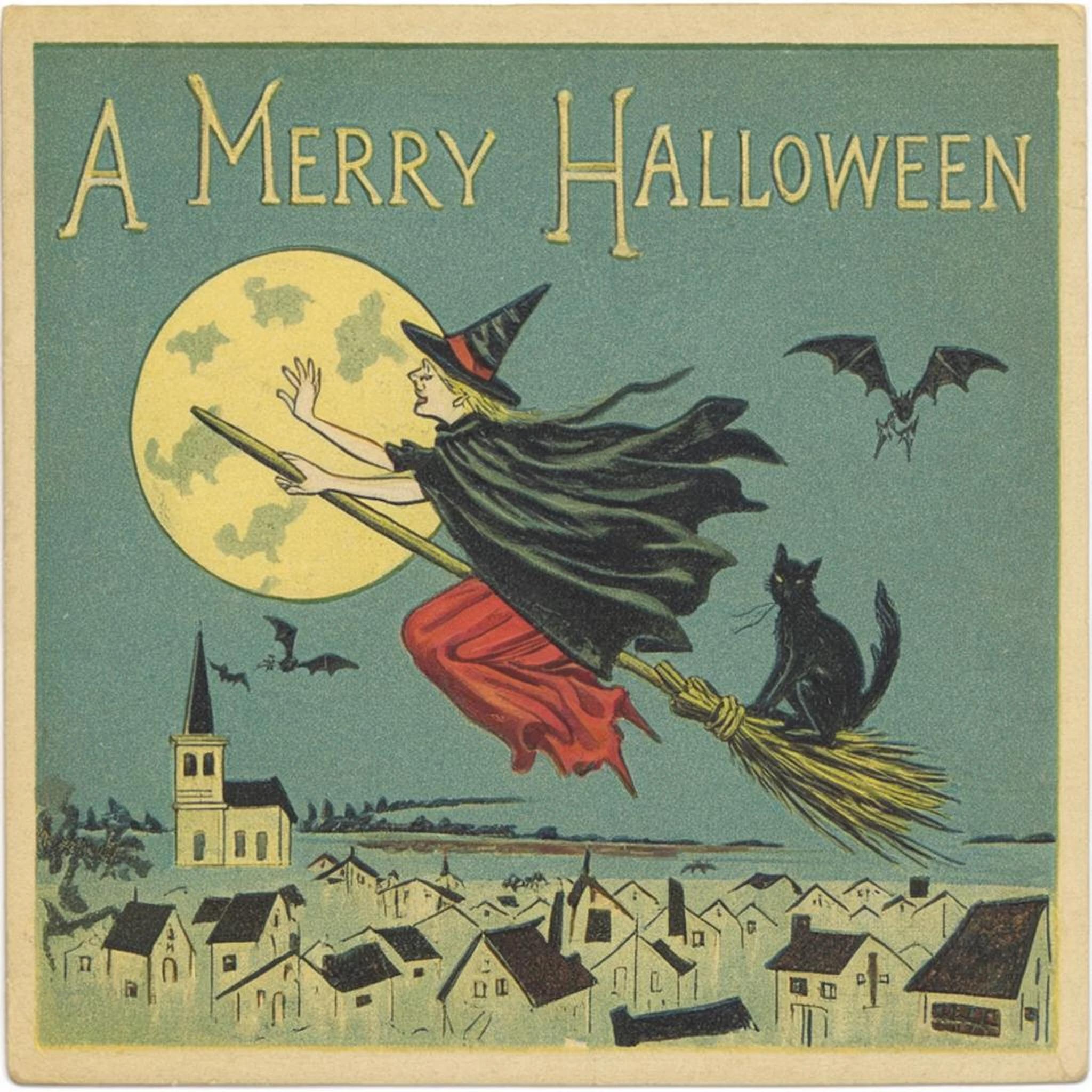
Use these test cards to choose both your learning-rate schedule and how far into the run to go. The runs for this guide compare five schedules (`constant_with_warmup`, `constant`, `linear`, linear decaying to zero, and `cosine`), each at 2,000 and 4,000 steps, plus the base model, with the same prompts and seeds. Our favorites were `constant_with_warmup` and `cosine`, both at 2,000 steps.
**cosine**
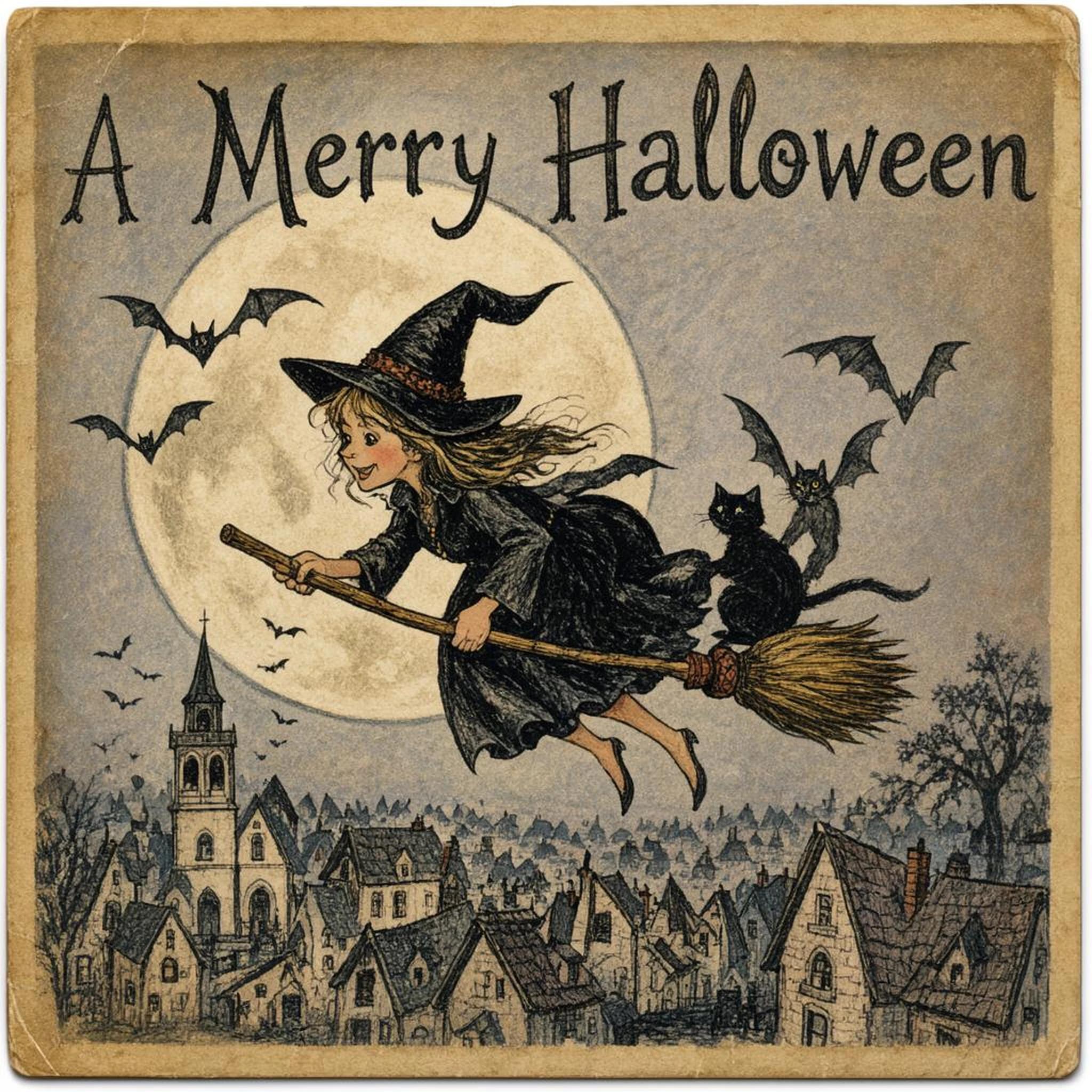
Step 0 (base)
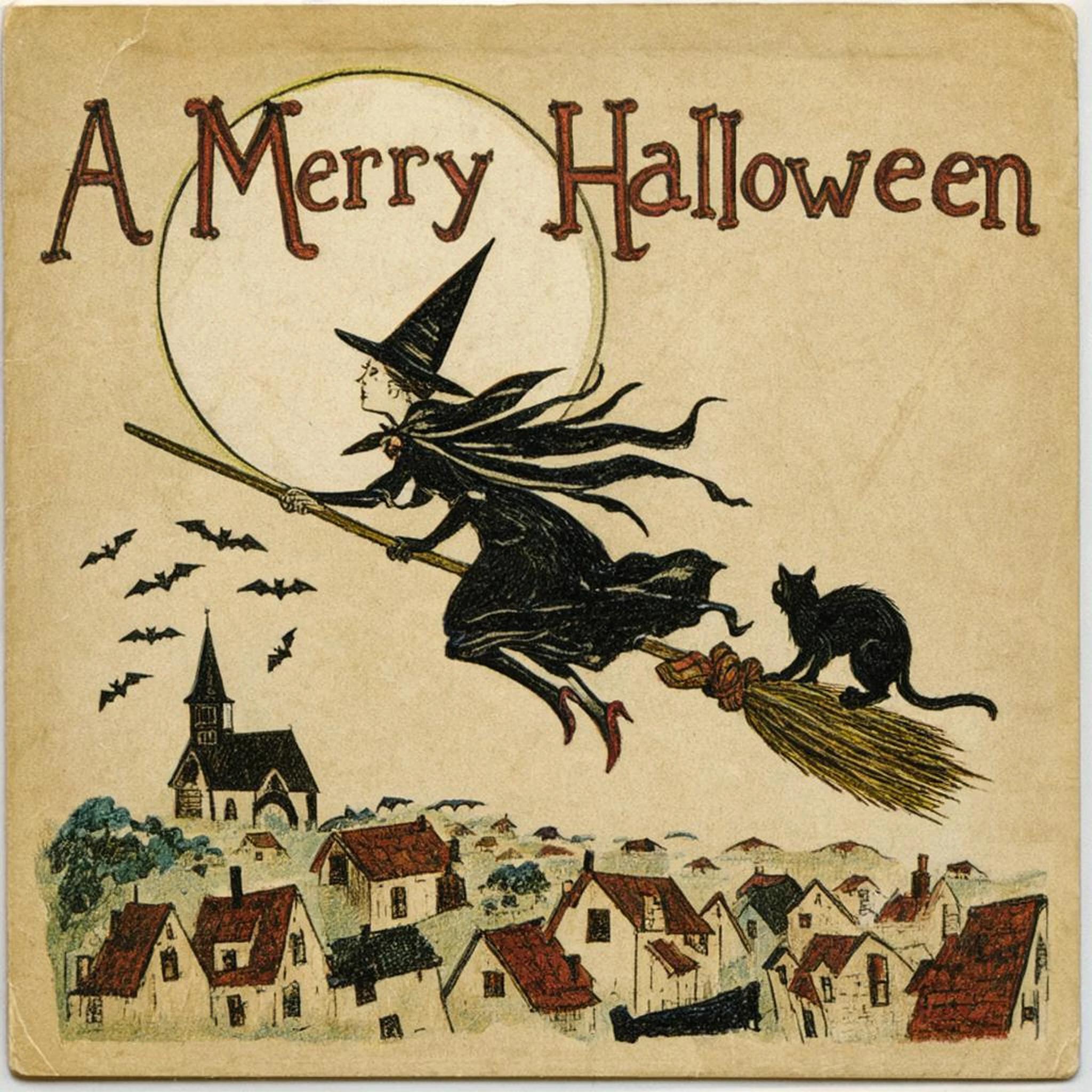
Step 2,000
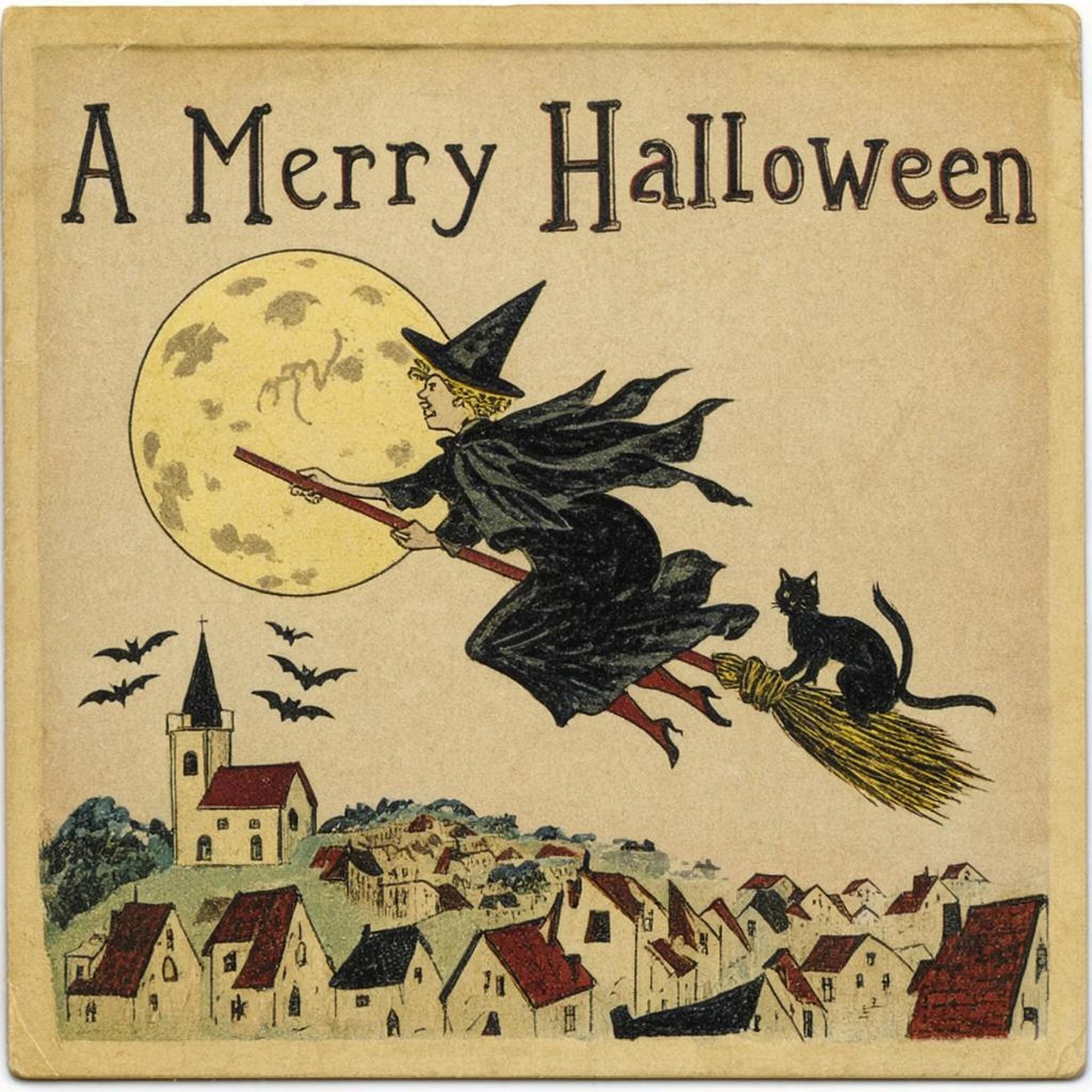
Step 4,000
**constant\_with\_warmup**

Step 0 (base)
Step 2,000
Step 4,000
The witch card at seed 907, both favorite runs, at steps 0, 2,000 and 4,000.
Here, step 2,000 looked better than 4,000. At 4,000 the `constant_with_warmup` run put the witch in a red skirt on a teal sky, close to cards 0033 and 0045 in the dataset, a sign it may be overfitting.
> [!NOTE]
>
> A `cosine` schedule depends on how long the whole run is. The `cosine` checkpoint in this guide came from step 2,000 of a 4,000-step run, where the learning rate was still at half its peak. If the run had been set to end at 2,000, the rate would have dropped to zero by then, and the result would be different.
The saves are named by step and sit in the run's output folder, so with the config above, the step 2,000 save is `halloween-lora_000002000.safetensors` and the final one is `halloween-lora.safetensors`.
## 6. Make cards with your LoRA
All that's left is to load your checkpoint on top of FLUX 3 Image Klein, run your prompt through the [prompt upsampler](https://docs.bfl.ml/flux_3/flux3_image_klein.md#prompt-upsampling) as you would for any Klein prompt, and put the trigger word at the start of the caption it returns. The upsampler has never seen `vqx`, so give it your request without the trigger and add `vqx, ` afterward. Asking it for "a flat, straight-on scan of an old Halloween greeting card" keeps it from photographing the card on a table. [This script](https://github.com/MaanavD/flux3-klein-lora-guide/blob/main/scripts/make_card.py) does all three.
Want to skip training? [Download the two checkpoints from this guide](https://github.com/MaanavD/flux3-klein-lora-guide/releases/tag/checkpoints-2000) (`klein-vqx-shift4k-cosine_000002000.safetensors` and `klein-vqx-shift4k-warmup_000002000.safetensors`), or [make your card on Hugging Face](https://huggingface.co/spaces/maanavdalal/flux3-klein-halloween-card).
Because the look is trained into the trigger word, the prompt doesn't need style words like "vintage" or "postcard". Still describe what you want on the card.
Every card here uses strength 1. You can change the strength to set how strongly the LoRA shows, so experiment with it.
## Make your own
Now swap in images you care about and run the same steps: gather them, caption them, pick a trigger word, train, and compare checkpoints.
The Public Domain Review's collections and Wikimedia Commons are good places to find images you can use. For your next LoRA, try [156 ukiyo-e prints from the Art Institute of Chicago](https://github.com/MaanavD/flux3-klein-lora-guide/tree/main/ukiyoe), all public domain.
FLUX 3 Image Klein, and any LoRA you train on it, are covered by the [FLUX Kommunity License](https://huggingface.co/black-forest-labs/flux-3-image-klein-base/blob/main/LICENSE.md). Check its terms before you share or sell what you make.
Have fun with your own datasets. Just use them responsibly.
This documentation is built and hosted on [Mintlify](https://mintlify.com), a developer documentation platform.