> ## Documentation Index
> Fetch the complete documentation index at: https://docs.bfl.ml/llms.txt
> Use this file to discover all available pages before exploring further.

# Prompting Basics

> Core concepts and foundational knowledge for prompting FLUX models 

export const PromptCarousel = ({slides = [], height = "500px"}) => {
  const [activeIdx, setActiveIdx] = useState(0);
  const items = slides.length > 0 ? slides : [{
    img: "https://images.unsplash.com/photo-1551963831-b3b1ca40c98e?w=800&fit=crop",
    prompt: "A cozy breakfast spread on a wooden table"
  }];
  const goTo = idx => {
    const next = Math.max(0, Math.min(items.length - 1, idx));
    setActiveIdx(next);
  };
  return <div className="not-prose" style={{
    borderRadius: "0.75rem",
    overflow: "hidden",
    border: "1px solid rgba(255,255,255,0.08)",
    background: "#000000",
    marginTop: 0
  }}>
      {}
      <div style={{
    position: "relative",
    width: "100%",
    height,
    overflow: "hidden"
  }}>
        <div style={{
    display: "flex",
    transition: "transform 400ms cubic-bezier(0.25, 1, 0.5, 1)",
    transform: `translateX(-${activeIdx * 100}%)`,
    height: "100%"
  }}>
          {items.map(item => <div key={item.img} style={{
    flex: "0 0 100%",
    height: "100%"
  }}>
              <img src={item.img} alt={item.prompt?.slice(0, 80) || ""} draggable={false} style={{
    display: "block",
    width: "100%",
    height: "100%",
    objectFit: "contain",
    pointerEvents: "none"
  }} />
            </div>)}
        </div>

        {items.length > 1 && <>
            <button onClick={() => goTo(activeIdx - 1)} style={{
    position: "absolute",
    top: "50%",
    left: "12px",
    transform: "translateY(-50%)",
    width: "40px",
    height: "40px",
    borderRadius: "50%",
    border: "none",
    background: "rgba(0,0,0,0.5)",
    backdropFilter: "blur(4px)",
    color: "#fff",
    cursor: "pointer",
    display: "flex",
    alignItems: "center",
    justifyContent: "center",
    zIndex: 2,
    opacity: activeIdx === 0 ? 0.3 : 1,
    transition: "opacity 200ms"
  }} disabled={activeIdx === 0}>
              <svg width="14" height="14" viewBox="0 0 14 14" fill="none"><path d="M9 2L4 7L9 12" stroke="#fff" strokeWidth="2" strokeLinecap="round" strokeLinejoin="round" /></svg>
            </button>
            <button onClick={() => goTo(activeIdx + 1)} style={{
    position: "absolute",
    top: "50%",
    right: "12px",
    transform: "translateY(-50%)",
    width: "40px",
    height: "40px",
    borderRadius: "50%",
    border: "none",
    background: "rgba(0,0,0,0.5)",
    backdropFilter: "blur(4px)",
    color: "#fff",
    cursor: "pointer",
    display: "flex",
    alignItems: "center",
    justifyContent: "center",
    zIndex: 2,
    opacity: activeIdx === items.length - 1 ? 0.3 : 1,
    transition: "opacity 200ms"
  }} disabled={activeIdx === items.length - 1}>
              <svg width="14" height="14" viewBox="0 0 14 14" fill="none"><path d="M5 2L10 7L5 12" stroke="#fff" strokeWidth="2" strokeLinecap="round" strokeLinejoin="round" /></svg>
            </button>
          </>}
      </div>

      {}
      {items.length > 1 && items[0]?.title ? <div style={{
    display: "flex",
    justifyContent: "center",
    gap: "4px",
    padding: "12px 8px 4px",
    flexWrap: "wrap"
  }}>
          {items.map((item, idx) => <button key={idx} onClick={() => goTo(idx)} style={{
    padding: "4px 12px",
    borderRadius: "6px",
    border: "none",
    cursor: "pointer",
    fontSize: "0.7rem",
    fontWeight: activeIdx === idx ? 700 : 500,
    background: activeIdx === idx ? "rgba(255,255,255,0.15)" : "transparent",
    color: activeIdx === idx ? "rgba(255,255,255,0.95)" : "rgba(255,255,255,0.45)",
    transition: "all 200ms ease"
  }}>
              {item.title}
            </button>)}
        </div> : items.length > 1 && <div style={{
    display: "flex",
    justifyContent: "center",
    gap: "8px",
    padding: "12px 0 4px"
  }}>
          {items.map((_, idx) => <button key={idx} onClick={() => goTo(idx)} style={{
    width: activeIdx === idx ? "24px" : "8px",
    height: "8px",
    borderRadius: "4px",
    border: "none",
    padding: 0,
    cursor: "pointer",
    background: activeIdx === idx ? "rgba(255,255,255,0.9)" : "rgba(255,255,255,0.3)",
    transition: "all 300ms ease"
  }} />)}
        </div>}

      {}
      <div style={{
    padding: "0.5rem 0.5rem 0.6rem"
  }}>
        <div style={{
    padding: "0.6rem 0.75rem",
    borderRadius: "6px",
    background: "rgba(255,255,255,0.06)",
    border: "1px solid rgba(255,255,255,0.10)",
    fontFamily: "monospace",
    fontSize: "0.75rem",
    lineHeight: 1.6,
    color: "rgba(255,255,255,0.7)",
    minHeight: "2.4rem",
    transition: "opacity 200ms ease"
  }}>
          <span style={{
    color: "rgba(255,255,255,0.35)",
    fontSize: "0.65rem",
    marginRight: "6px"
  }}>prompt:</span>
          {items[activeIdx]?.prompt || ""}
        </div>
      </div>
    </div>;
};

export const PromptDisplay = ({prompt}) => {
  const [copied, setCopied] = useState(false);
  const copy = () => {
    navigator.clipboard.writeText(prompt);
    setCopied(true);
    setTimeout(() => setCopied(false), 2000);
  };
  return <div className="not-prose" style={{
    marginTop: "1rem"
  }}>
      <div style={{
    backgroundColor: "#1a1a1a",
    borderRadius: "1rem",
    padding: "1.25rem 1.5rem",
    display: "flex",
    flexDirection: "column",
    gap: "1rem"
  }}>
        <p style={{
    color: "#e5e5e5",
    fontSize: "1rem",
    lineHeight: 1.6,
    margin: 0,
    fontFamily: "inherit"
  }}>
          {prompt}
        </p>
        <div style={{
    display: "flex",
    justifyContent: "flex-end"
  }}>
          <button onClick={copy} style={{
    backgroundColor: copied ? "#3d8a5b" : "var(--aspen-evergreen, #486A58)",
    color: "#fff",
    border: "none",
    borderRadius: "0.375rem",
    padding: "0.25rem 0.6rem",
    fontSize: "0.7rem",
    fontWeight: 600,
    cursor: "pointer",
    transition: "background-color 0.2s"
  }}>
            {copied ? "Copied!" : "Copy prompt"}
          </button>
        </div>
      </div>
    </div>;
};

export const CarouselThumbnails = ({images, height = "400px", thumbHeight = 60}) => {
  const [activeIdx, setActiveIdx] = useState(0);
  const items = images || [{
    img: "https://images.unsplash.com/photo-1551963831-b3b1ca40c98e?w=800&fit=crop",
    title: "Breakfast"
  }, {
    img: "https://images.unsplash.com/photo-1551782450-a2132b4ba21d?w=800&fit=crop",
    title: "Burger"
  }, {
    img: "https://images.unsplash.com/photo-1522770179533-24471fcdba45?w=800&fit=crop",
    title: "Camera"
  }, {
    img: "https://images.unsplash.com/photo-1444418776041-9c7e33cc5a9c?w=800&fit=crop",
    title: "Coffee"
  }, {
    img: "https://images.unsplash.com/photo-1533827432537-70133748f5c8?w=800&fit=crop",
    title: "Hats"
  }, {
    img: "https://images.unsplash.com/photo-1558642452-9d2a7deb7f62?w=800&fit=crop",
    title: "Honey"
  }, {
    img: "https://images.unsplash.com/photo-1516802273409-68526ee1bdd6?w=800&fit=crop",
    title: "Basketball"
  }, {
    img: "https://images.unsplash.com/photo-1518756131217-31eb79b20e8f?w=800&fit=crop",
    title: "Fern"
  }];
  return <div className="not-prose" style={{
    width: "100%",
    borderRadius: "1rem",
    overflow: "hidden",
    border: "1px solid rgba(255,255,255,0.1)",
    background: "#0a0a0a",
    marginTop: 0
  }}>
      {}
      <div style={{
    position: "relative",
    width: "100%",
    height,
    overflow: "hidden"
  }}>
        <div style={{
    display: "flex",
    transition: "transform 400ms cubic-bezier(0.25, 1, 0.5, 1)",
    transform: `translateX(-${activeIdx * 100}%)`,
    height: "100%"
  }}>
          {items.map(item => <div key={item.img} style={{
    flex: "0 0 100%",
    height: "100%"
  }}>
              <img src={item.img} alt={item.title} draggable={false} style={{
    display: "block",
    width: "100%",
    height: "100%",
    objectFit: "contain",
    pointerEvents: "none"
  }} />
            </div>)}
        </div>

        {}
        <div style={{
    position: "absolute",
    top: "12px",
    right: "12px",
    padding: "4px 10px",
    borderRadius: "6px",
    background: "rgba(0,0,0,0.55)",
    backdropFilter: "blur(4px)",
    color: "#fff",
    fontSize: "0.75rem",
    fontWeight: 600,
    pointerEvents: "none",
    zIndex: 3
  }}>
          {activeIdx + 1} / {items.length}
        </div>
      </div>

      {}
      <div style={{
    display: "flex",
    gap: "4px",
    padding: "8px",
    overflowX: "auto",
    scrollbarWidth: "none"
  }}>
        {items.map((item, idx) => <button key={item.img} onClick={() => setActiveIdx(idx)} style={{
    flexShrink: 0,
    width: `${thumbHeight * 1.5}px`,
    height: `${thumbHeight}px`,
    borderRadius: "6px",
    overflow: "hidden",
    border: activeIdx === idx ? "2px solid rgba(255,255,255,0.8)" : "2px solid transparent",
    opacity: activeIdx === idx ? 1 : 0.5,
    transition: "all 250ms ease",
    cursor: "pointer",
    padding: 0,
    background: "none"
  }}>
            <img src={`${item.img}?w=180&h=120&fit=crop&auto=format`} alt={item.title} draggable={false} style={{
    display: "block",
    width: "100%",
    height: "100%",
    objectFit: "cover",
    pointerEvents: "none"
  }} />
          </button>)}
      </div>

      {}
      <div style={{
    padding: "0.5rem 0.5rem 0.6rem"
  }}>
        <div style={{
    padding: "0.6rem 0.75rem",
    borderRadius: "6px",
    background: "rgba(255,255,255,0.04)",
    border: "1px solid rgba(255,255,255,0.08)",
    fontFamily: "monospace",
    fontSize: "0.75rem",
    lineHeight: 1.6,
    color: "rgba(255,255,255,0.7)",
    minHeight: "2.4rem",
    transition: "opacity 200ms ease"
  }}>
          <span style={{
    color: "rgba(255,255,255,0.35)",
    fontSize: "0.65rem",
    marginRight: "6px"
  }}>prompt:</span>
          {items[activeIdx]?.title || ""}
        </div>
      </div>
    </div>;
};

export const PromptFormulaFrame = () => {
  return <div className="prompt-formula-card not-prose">
      <div className="prompt-formula-card__border">
        <div className="prompt-formula-card__surface">
          <div className="prompt-formula-card__wash" aria-hidden="true" />
          <pre className="prompt-formula-card__copy">
            {`[SUBJECT], [LOCATION],
[STYLE], [CAMERA SETTINGS], [LIGHTING], [COLORS], [EFFECT],
[ADDITIONAL ELEMENTS]`}
          </pre>
        </div>
      </div>
    </div>;
};

### What is Prompting?

Prompting in text-to-image generation refers to the process of entering a text description — the prompt — that FLUX uses to generate a matching image. Your prompt is the primary way you communicate intent: what should be in the image, how it should look, and what mood or style it should convey.

<div className="prompt-image-stack">
  <img className="prompt-image-stack__image" src="https://cdn.sanity.io/images/2gpum2i6/production/7b51ac4d05b7cb52ed7f64493596245075be35c4-1840x1088.png" alt="Chromatic 3D cursor on a black background" />

  <PromptDisplay prompt="a chromatic 3D rendition of a cursor, black background" />
</div>

## What Can a Prompt Look Like?

A prompt passed to FLUX can take many forms. There is no single correct format — what matters is that your description gives FLUX enough to work with.

<PromptFormulaFrame />

<Tip>
  This template is a useful starting structure, not a strict formula. You can keep it concise, expand individual slots, or ignore parts that are not relevant to your image.
</Tip>

## Use Natural Language

FLUX works best when your prompt reads like a clear description of the image you want to generate. Natural language helps the model understand what should appear in the image, how the elements relate to each other, and what visual direction to follow. The clearer the description, the easier it is for FLUX to produce a focused and consistent result.

<PromptCarousel
  height="500px"
  slides={[
{
  img: "https://cdn.sanity.io/images/2gpum2i6/production/81ed3f645a76a4af25ceb1e927849d2226f6992d-1504x1008.png",
  prompt: "At high noon on a blustery day, capture the surreal presence of a sentient tree, seemingly rooted underwater just off a tumultuous ocean shore. Employ a sweeping panning shot, bathing the scene in cinematic natural light and a stark palette of winter whites and greys, as if glimpsing a spectral sentinel through a watery veil."
},
{
  img: "https://cdn.sanity.io/images/2gpum2i6/production/055402a70efb2876f1f70549374d7a37d71918f7-1504x1008.png",
  prompt: "A professional cinematic long shot with the camera positioned half underwater and half above the surface in the open ocean. Beneath the water, a large northern whale is diving smoothly, its tail rising above the surface while the rest of its body descends into the deep blue. The ocean is calm and clear, with bubbles drifting upward from the whale and soft sun rays piercing through the water."
},
{
  img: "https://cdn.sanity.io/images/2gpum2i6/production/c028ca9c6ba957278d0ecb695636b6bba26f7eb3-1504x1008.png",
  prompt: "A wide, sweeping 35mm Kodak film aerial photograph, underexposed and richly grainy, capturing the iconic Victoria Harbour of Hong Kong at dusk. The sky is a blend of soft, desaturated oranges, purples, and deep twilight blues. The water of the harbour reflects the fading light and the emerging city glow."
},
{
  img: "https://cdn.sanity.io/images/2gpum2i6/production/2a6bb30c8acc4a2adfa7673517c5d07e7beb6949-1504x1008.png",
  prompt: "Realistic moody nature photograph of a white swan gliding calmly on still dark water, captured in soft natural light. The swan’s reflection is clearly visible on the surface. The scene is framed by out-of-focus foliage in the foreground, creating a natural vignette and a sense of depth. Warm golden tones from late-day sunlight."
},
{
  img: "https://cdn.sanity.io/images/2gpum2i6/production/120680795c38b561880fbc5e265d5d7b6040f22c-1504x1008.png",
  prompt: "A penguin wearing a tiny tuxedo to a penguin wedding"
},
]}
/>

## Text in images

When you want FLUX to generate specific text inside an image, place the exact wording in quotation marks. This makes it clearer that the text should appear visibly in the final image, rather than being treated as part of the general prompt description. Quotation marks help separate written content from the rest of the scene, which gives FLUX a stronger signal to render the words as text.

<PromptCarousel
  height="500px"
  slides={[
{
  img: "https://cdn.sanity.io/images/2gpum2i6/production/b3300d8897ec5682f886be1c9576c7a7084d775e-1504x1008.png",
  prompt: "A photorealistic still life of matchsticks arranged on a beige paper background. On the left, a group of burnt-out matchsticks leaning together with charred black tips and rising smoke. In the center, a single unlit match standing upright, separating the two groups. On the right, a neat row of fresh red-tipped matches. Below the scene, bold serif typography reads \"The Importance Of Being Non-Aligned\". Warm, soft studio lighting with subtle shadows."
},
{
  img: "https://cdn.sanity.io/images/2gpum2i6/production/e55dd7892b9ef7e9a3ee0f46ac6cf77b1d508fa8-1504x1008.png",
  prompt: "An anime-style illustration of a cute snake being poked on the head by a human finger. The snake has big blue eyes and a gentle smile. A white speech bubble reads \"Wow, what are you doing here?! I am sleeping\". Sandy desert background with warm tones. Soft cel-shading, expressive cartoon style."
},
{
  img: "https://cdn.sanity.io/images/2gpum2i6/production/b7f4b87f8eb8d23633fe09fdc6ca83ed71d4acdf-1504x1008.png",
  prompt: "A humorous infographic-style meme image with the bold headline \"WHY DOES THIS CHAT KEEP GETTING RESET\" at the top. The scene shows a person at a desk squeezed between two large server towers labeled \"MEMORY LIMIT\" and \"TOKEN BUDGET\". In the center, a red warning triangle reads \"DELETION ZONE\" with fire and emojis. A green banner says \"YOUR BEAUTIFUL IMAGES\" and a \"404 IMAGES LOST\" error badge appears on the right. Three info boxes at the bottom with satirical descriptions. Clean digital illustration style with blue and teal tones."
},
{
  img: "https://cdn.sanity.io/images/2gpum2i6/production/8771cfc4a0d0cd5257a452926c1d722c36e8b411-1504x1008.png",
  prompt: "A set of five car air freshener stickers on a gray background, each shaped differently and spelling out \"FLUX 2\". A blue star-burst shape with \"F\" and \"Fast\", a red droplet with a rainbow \"L\" and \"Lightweight\", a holographic rounded square with green \"U\" and \"Upscaled\", a green Christmas tree shape with \"X\" and \"Xtra\", and a round red prohibition sign with a banana and the number \"2\". Glossy sticker aesthetic with subtle shadows."
},
]}
/>

## Refine As You Go

Strong prompts usually come from iteration, not from trying to write the perfect prompt on the first attempt.

A practical loop is:

1. Start with a simple version
2. Check what FLUX got right and wrong
3. Adjust one important detail at a time

If the image is close but not there yet, tweak the subject, framing, lighting, or style before rewriting everything.

<CarouselThumbnails
  height="400px"
  thumbHeight={60}
  images={[
{
  img: "https://cdn.sanity.io/images/2gpum2i6/production/212505bd3782a164c4aabb82241b4de891376715-2048x1376.png",
  title: "A tall sharp-featured man in an oversized charcoal wool coat"
},
{
  img: "https://cdn.sanity.io/images/2gpum2i6/production/08b62970a32a753eec0e3d4a421eb880715ed9fb-2048x1376.png",
  title: "A tall sharp-featured man in an oversized charcoal wool coat, standing on a wet cobblestone street at night"
},
{
  img: "https://cdn.sanity.io/images/2gpum2i6/production/d213308ada76d6e6917e890c9f441869ea8eb383-2048x1376.png",
  title: "A tall sharp-featured man in an oversized charcoal wool coat, standing on a wet cobblestone street at night, fashion editorial, moody street lighting, oversized charcoal wool Maison Margiela coat, he holds a teddybear in his hands"
},
{
  img: "https://cdn.sanity.io/images/2gpum2i6/production/0960834da97c20ab384f221b8f823e2892cf0ff6-2048x1376.png",
  title: "A tall sharp-featured man in an oversized charcoal wool coat, standing on a wet cobblestone street at night, fashion editorial, moody street lighting, oversized charcoal wool Maison Margiela coat, he holds a teddybear in his hands, a dog walks beside him"
},
{
  img: "https://cdn.sanity.io/images/2gpum2i6/production/493cc4896b457fd0ea26ecba9fd85c60334b7a38-2048x1376.png",
  title: "A tall sharp-featured man in an oversized charcoal wool coat, standing on a wet cobblestone street at night, fashion editorial, moody street lighting, oversized charcoal wool Maison Margiela coat, he holds a teddybear in his hands, a dog walks beside him, colorful vintage cars parked in the background"
},
{
  img: "https://cdn.sanity.io/images/2gpum2i6/production/797944a0e6e97bec18df8d5f95800e3fe63910b4-2048x1376.png",
  title: "A tall sharp-featured man in an oversized charcoal wool coat, standing on a wet cobblestone street at night, fashion editorial, moody street lighting, oversized charcoal wool Maison Margiela coat, he holds a teddybear in his hands, a dog walks beside him, colorful vintage cars parked in the background, colorful vintage VW cars lined up behind, flash photography, dark sky"
},
{
  img: "https://cdn.sanity.io/images/2gpum2i6/production/854dc146917aac5babcf3325cdc72846b87a856e-2048x1376.png",
  title: "A tall sharp-featured man in an oversized charcoal wool coat, standing on a wet cobblestone street at night, fashion editorial, moody street lighting, oversized charcoal wool Maison Margiela coat, he holds a teddybear in his hands, a dog walks beside him, colorful vintage cars parked in the background, colorful vintage VW cars lined up behind, flash photography, dark sky, watercolor illustration style"
},
]}
/>

## Multilingual Prompting

FLUX can be prompted in multiple languages. You don't need to write in English to get great results — FLUX understands a wide range of languages and responds to them with the same level of quality.

<PromptCarousel
  height="500px"
  slides={[
{
  img: "https://cdn.sanity.io/images/2gpum2i6/production/8a40586328d743738425c85d3aca6d5d63e46f29-2048x1376.png",
  prompt: "日本の寿司職人が、薄暗い照明のカウンターで丁寧にネタを握っている。木製のカウンターに並ぶ色とりどりの寿司。"
},
{
  img: "https://cdn.sanity.io/images/2gpum2i6/production/7813dcaafb06d738198b38f17e79b9b4e13a18cd-2048x1376.png",
  prompt: "ไทยบ็อกซิ่ง นักมวยนั่งพักที่มุมสังเวียน ใบหน้าเปื้อนเหงื่อ สวมนวมแดง แสงไฟสปอตไลท์ส่องลงมา"
},
{
  img: "https://cdn.sanity.io/images/2gpum2i6/production/c0b0c480da59bfc4e48a03063d3c5da941640a92-2048x1376.png",
  prompt: "Una bailaora de flamenco en pleno movimiento, vestido rojo girando, fondo negro, iluminación dramática de escenario"
},
{
  img: "https://cdn.sanity.io/images/2gpum2i6/production/a4b2f6c50aeac5688ec5dd717151f32e35f90eff-2048x1376.png",
  prompt: "Ein alter Trompeter sitzt auf einem Holzstuhl vor einer verwitterten Hauswand in Havanna, goldenes Abendlicht, kubanische Straßenszene"
},
{
  img: "https://cdn.sanity.io/images/2gpum2i6/production/614cd98b846235bbffc2043eeff357c7e1f135a8-2048x1376.png",
  prompt: "Norðurljós yfir fossi á Íslandi, ískristall í forgrunni, dramatískt náttúrulandslag, löng lýsing"
},
{
  img: "https://cdn.sanity.io/images/2gpum2i6/production/bbe467f717ded0734f9688bf4c73a71761e7a2a1-2048x1376.png",
  prompt: "شجرة وحيدة في صحراء حمراء عند غروب الشمس، كثبان رملية متموجة، ظلال طويلة، سماء متدرجة من البرتقالي إلى الأزرق"
},
{
  img: "https://cdn.sanity.io/images/2gpum2i6/production/332437c9c461188d431860dba3755aa1699c28f1-2048x1376.png",
  prompt: "Ένας ηλικιωμένος μελισσοκόμος φροντίζει τις κυψέλες του σε ελληνικό νησί, γαλάζια θάλασσα στο βάθος, καλοκαιρινό φως"
},
]}
/>

<Tip>
  That said, English prompts tend to produce the most precise results, as the majority of FLUX's training data is in English.
</Tip>

## Image Input

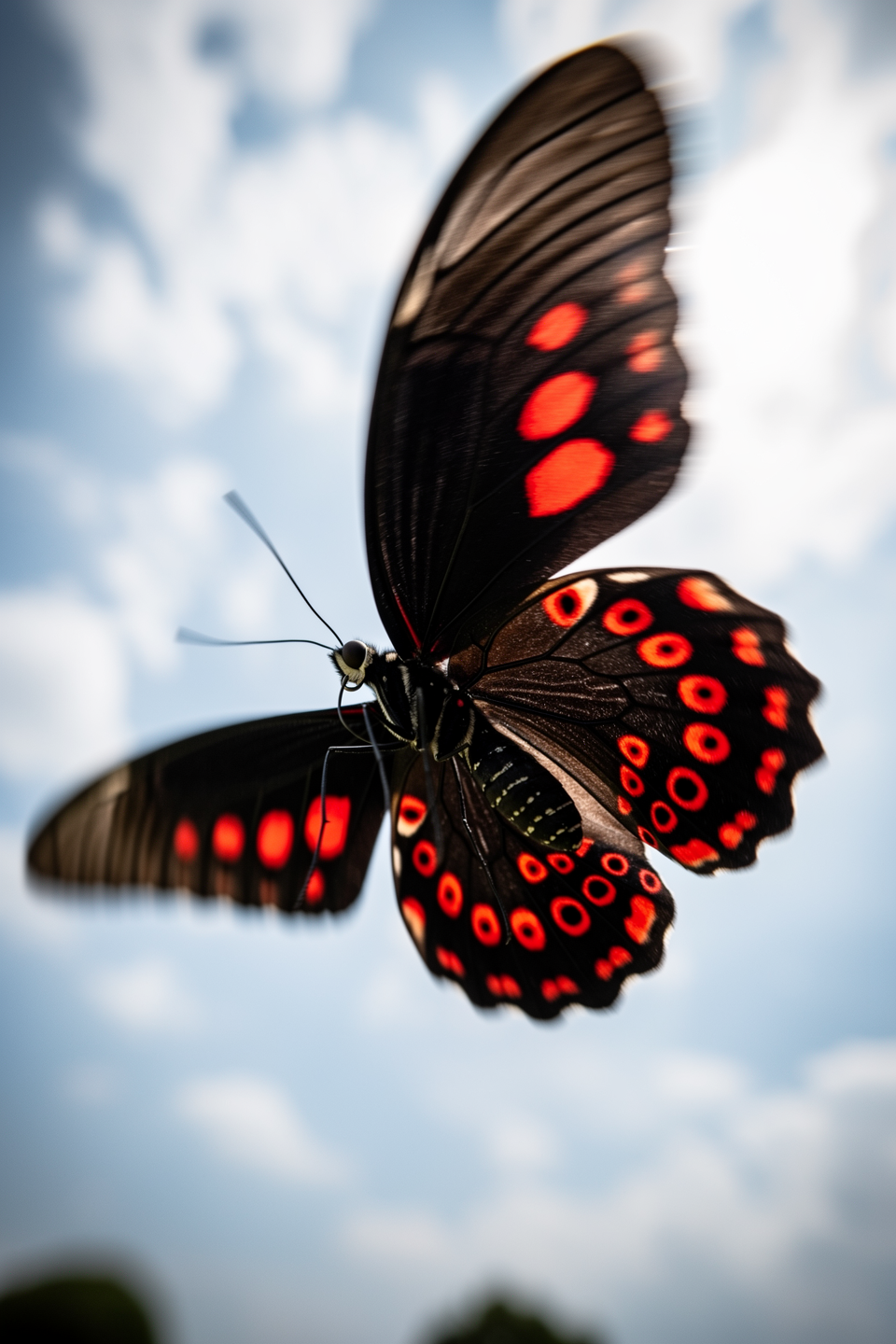
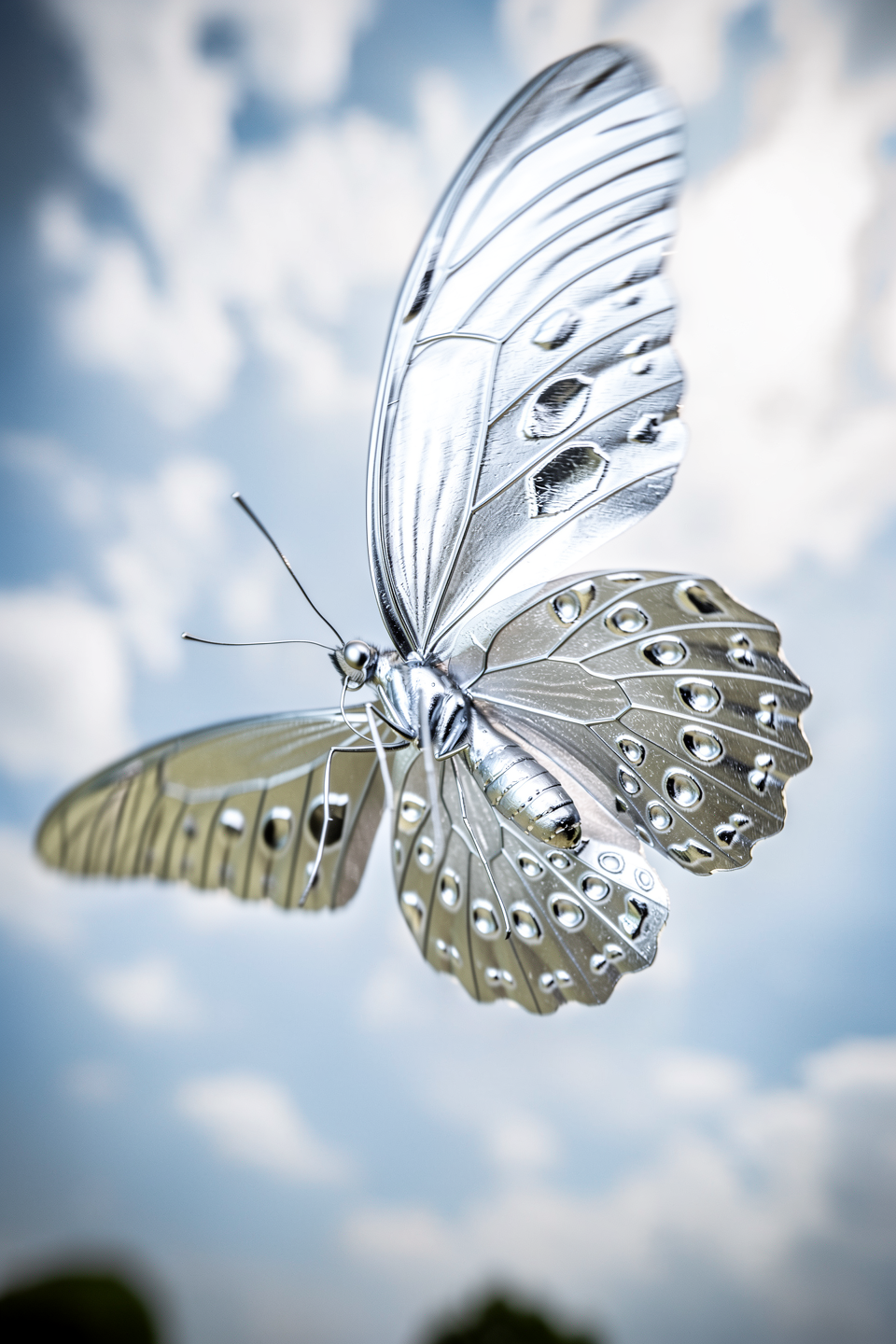
With **FLUX.1 Kontext** and **FLUX.2**, your prompt isn't limited to text. These models accept up to 10 images as additional input alongside your text prompt — allowing you to edit existing images, transfer styles, maintain character consistency across generations, or composite multiple references into a single output.

<Columns cols={2}>
  <Frame caption="Input image">
    <img src="https://cdn.sanity.io/images/2gpum2i6/production/ce6665b32fd9f96a2c1bb8bd30e73b000912d225-960x1440.png" alt="Red and black butterfly in flight" />
  </Frame>

  <Frame caption="Result">
    <img src="https://cdn.sanity.io/images/2gpum2i6/production/d8b6455ab9ab2ee12c914be6afa4bea3fcc414b3-960x1440.png" alt="Silver metallic butterfly in flight" />
  </Frame>
</Columns>

<PromptDisplay prompt="The butterfly is now made of shiny silver" />

<Tip>
  Image-based prompting is covered in depth in the [Image Editing with FLUX](/guides/prompting_editing_overview) section of this guide.
</Tip>